

















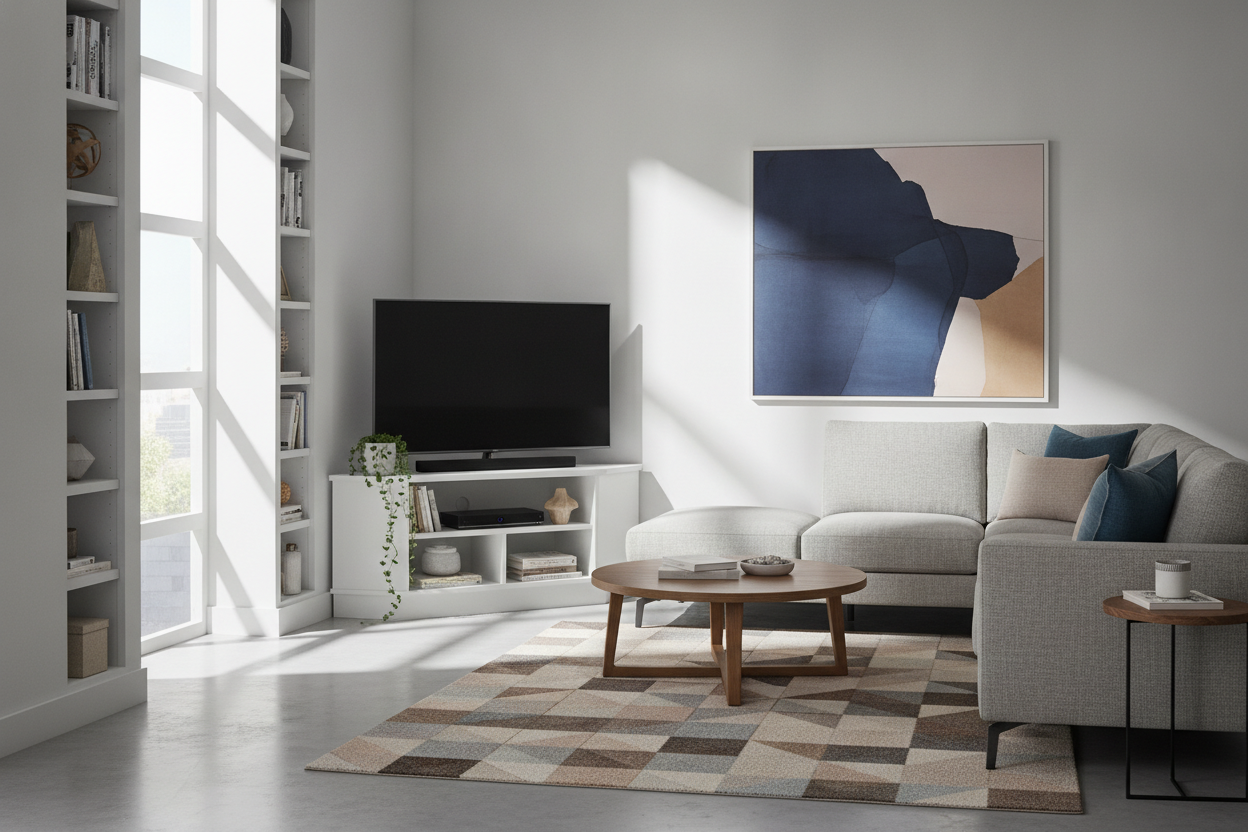
I spent three months staring at a 60-inch black rectangle that hogged the only decent wall in my apartment. Every time I walked in, it felt like I was entering a Cineplex, not a home. I tried smaller rugs, I tried gallery walls around it, but nothing worked until I finally admitted defeat and bought a 60 inch corner tv stand.
Quick Takeaways
- Moving your TV to the corner breaks the 'shrine' layout where all furniture points at one wall.
- A 60-inch unit requires about 40-45 inches of wall space on each side of the corner.
- Solid wood or high-grade MDF is a must; cheap particle board will sag under a 60-inch screen within six months.
- Closed storage is the only way to keep the 'nest of cables' from ruining the aesthetic.
The Day I Realized My Living Room Was Just a Movie Theater
I walked into my living room with a coffee in hand and stopped dead. My sofa, my two expensive accent chairs, and even my floor lamp were all angled toward a massive void on the wall. It was a corner tv stand 60 inch flat screen setup waiting to happen, but I was stubbornly clinging to the 'center-wall' rule. My home didn't feel like a place for conversation; it felt like a waiting room for a blockbuster premiere.
The problem with big screens is their gravity. They pull everything toward them. In an open-concept rental, that means your dining area and your lounging area both end up subservient to the TV. I realized I was wasting the best wall in the house—the one with the most natural light—on a piece of plastic and glass that stayed off 18 hours a day.
I’ve assembled enough furniture to know that moving a 60-pound console isn't a solo Saturday afternoon job, but I was desperate. I needed to reclaim the heart of the room. The transition wasn't just about moving a piece of furniture; it was about changing the entire flow of how I lived in the space.
Why a 60 Inch Corner TV Stand Was My Layout Cheat Code
By tucking the screen into the corner, the room suddenly breathed. The 'main' wall was suddenly naked, which sounds scary until you realize it’s actually an opportunity. I remember when I gave up my main wall for a 55 inch corner tv stand in my last place, but the jump to a 60-inch model required more intentionality. You can't just shove a large screen into a corner and hope for the best; it has to be the right scale.
A 60 inch corner tv stand acts as a visual anchor that doesn't demand center stage. It allows you to orient your seating toward each other. Now, my sofa faces the chairs, and the TV is 'over there.' It's accessible when I want to watch a game, but it's not the first thing you see when you walk through the door. This shift is the ultimate layout hack for anyone dealing with a long, narrow room or an awkward L-shaped floor plan.
I chose a unit with a slightly tapered back. If you buy a standard rectangular stand and try to angle it, you end up with a massive, dusty triangle of wasted space behind it. A dedicated corner unit fits flush, or nearly flush, which makes the whole setup look built-in rather than an afterthought.
The Tricky Geometry of a Corner Stand for 60 TV Setups
Let's talk math, because I've seen too many people buy a corner stand for 60 tv only to realize their screen juts out three inches past the edge. A 60-inch TV is usually about 53 inches wide. Your stand needs to be at least that wide to avoid looking top-heavy and unstable. If you go too small, you risk the 'lollipop' effect where the screen looks like it’s teetering on a toothpick.
Depth is the other killer. A corner unit for a screen this size will sit about 20 to 25 inches deep from the corner point. You have to measure your walking paths. If you have a high-traffic area right next to that corner, you might find yourself bumping into the corner of the screen. I briefly considered a rustic corner tv stand for 65 inch tv, but the extra four inches of depth would have blocked my path to the balcony. Stick to the 60-inch scale if your room is under 300 square feet.
Viewing angles are also key. When the TV is in the corner, you might need to pull your seating slightly further back to avoid neck strain. I found that 8 to 9 feet is the sweet spot for a screen this size when it's angled at 45 degrees in a corner.
What I Did With My Reclaimed Main Wall
Once the TV was relegated to its corner, I had a 12-foot stretch of drywall that was finally mine to play with. I didn't just want to fill it with 'stuff.' I installed a large-scale triptych of art I’d been hoarding in the closet. It immediately made the room feel like an adult lived there. Without the black rectangle competing for attention, the colors in the art actually popped.
If you aren't an art person, this is where you put the 'heavy' furniture. A credenza for your record player or a floor-to-ceiling bookshelf works perfectly here. For those who still want the option to hide the tech entirely, a lifting TV stand is a slick alternative, but for my budget and my rental, the corner move was the most effective fix.
I also added a large floor mirror where the TV used to be. It bounced the light from the opposite window and doubled the perceived size of the room. It’s a classic trick, but it’s a classic for a reason. My living room went from feeling like a dark cave to a bright, airy studio overnight.
Finding Corner TV Stands for 60 Inch Flat Screens (That Actually Look Good)
Shopping for corner tv stands for 60 inch flat screens can be a nightmare because so many designs look like they belong in a 1990s dorm room. Avoid anything with silver plastic legs or open glass shelves. Glass shelves are a curse; they show every speck of dust and leave your cable management (or lack thereof) on full display for every guest to see.
I look for 'transitional' styles—something with clean lines but warm wood tones. Look for a 60 corner tv stand with cord management holes that are actually large enough to fit a surge protector plug through. You’d be surprised how many 'media consoles' make you struggle with a 1-inch hole for a 2-inch plug. I personally prefer units with mesh or louvered doors; they hide the clutter but still let the remote signal through.
When browsing stylish TV stands, check the weight capacity. A 60-inch TV isn't as heavy as the old plasma beasts, but with a soundbar and a few consoles, you’re still putting 70+ pounds on that top shelf. Look for a center support leg. It’s the difference between a piece of furniture that lasts a decade and one that starts to 'smile' (sag) in the middle after two months of use.
FAQ
Will a 60-inch TV fit on a 50-inch corner stand?
Technically, the base might fit, but the edges of the TV will overhang. It looks terrible and is a major safety hazard if someone bumps into it. Always match the stand width to the actual width of the TV frame.
How do I hide the cables in a corner setup?
Corner stands are notorious for showing wires from the side. Choose a model with a closed back and use adhesive cable clips to run the wires down the back leg of the stand rather than letting them hang in the 'triangle' space behind the unit.
Is a corner TV stand better than wall mounting?
In a rental, 100%. You avoid the 'black hole' on the wall and don't have to patch massive holes when you move. Plus, it gives you extra storage for things like routers and gaming consoles that look messy on a floating shelf.

Leave a comment
This site is protected by hCaptcha and the hCaptcha Privacy Policy and Terms of Service apply.