

















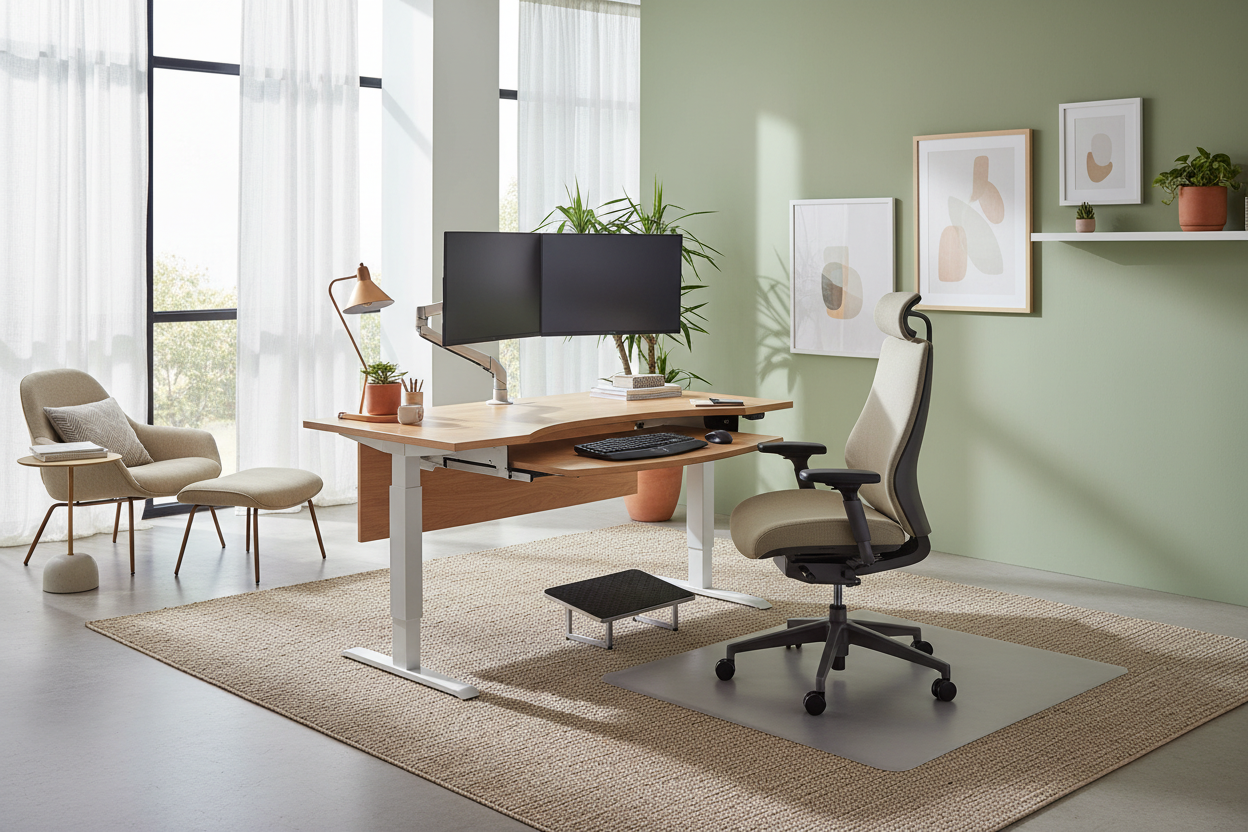
We have all been there: trying to meet a deadline while perched on a dining chair that feels increasingly like a torture device. As an interior designer, I see this constantly. Clients invest heavily in the aesthetic of their workspace but treat comfort as an afterthought. The reality is that a poor layout doesn't just ruin your posture; it ruins your workflow. Creating a professional ergonomics set up is not merely about buying a 'good chair'—it is about harmonizing human mechanics with spatial design.
Quick Decision Guide: The Pillars of Ergonomics
If you are rushing to purchase furniture, look for these non-negotiable features to ensure you are building the best ergonomic setup:
- Adjustability is King: Look for chairs with seat slide, lumbar depth, and armrest height adjustments. One fixed shape rarely fits all.
- Material Breathability: For seating, high-quality mesh or perforated leather promotes airflow, preventing heat buildup during long sessions.
- Desk Depth: An ergonomic home desk should be at least 30 inches deep to allow proper focal distance for monitors.
- Monitor Height: The top third of your screen should be at eye level to keep your cervical spine neutral.
- Lighting Layers: Combine ambient overhead lighting with task lighting to reduce eye strain and glare.
The Foundation: Seating and Desk Selection
The core of any ergonomic home office is the relationship between the chair and the desk. When curating an ergonomic for home office use, we must look past the silhouette and focus on the mechanics. A common misconception is that soft equals comfortable. In reality, firm support with dynamic flexibility is what sustains you for eight hours.
Selecting the Chair
For the best ergonomic home office setup, your chair must act as an extension of your spine. Avoid rigid plastics. Instead, seek out synchro-tilt mechanisms which allow the seat and backrest to move in a ratio (usually 2:1), keeping your feet flat on the floor while you recline. This movement promotes circulation, which is vital for an ergonomic work from home setup.
The Desk Dynamics
Whether you choose a standing desk or a fixed-height console, the edge profile matters. I often advise clients to avoid sharp, square edges on desktops, as these compress the nerves in the forearms. A beveled or waterfall edge is a subtle detail that significantly improves the comfort of an ergonomic workstation setup at home.
Spatial Planning and Monitor Placement
How to set up an ergonomic home office goes beyond furniture; it is about geometry. The 'Triangle of Reach' concept is crucial here. Your keyboard and mouse should be within immediate reach with your elbows at a 90-100 degree angle. Secondary items, like notebooks or tablets, should be in the secondary zone to prevent overextending the shoulder girdle.
For the visual aspect, placing your screen perpendicular to windows eliminates glare, a key factor in home office ergonomics tips. If you are using dual monitors, center them to avoid constant neck rotation. This symmetry is essential for maintaining a neutral posture throughout the day.
Lessons from My Own Projects
My Personal Take on Ergonomics Set Up
I learned the hard way that 'high-end' doesn't always mean 'high-performance.' Early in my career, I designed an ergonomic office setup at home for a writer. I specified a stunning, vintage teak desk. It was beautiful, but the apron (the drawer structure underneath) was too low. It forced her to sit too far back or lower her chair until her knees were at an awkward angle.
I had to completely retrofit the piece, removing the center drawer to create leg clearance. It taught me a valuable lesson: always measure the 'knee clearance' height, not just the desktop height. Another detail I obsess over now is the texture of the mousepad area. I once used a textured reclaimed wood top that snagged mouse movements—now, I always insist on a smooth leather desk blotter for any ergonomic setup at home. It creates a soft tactile bridge between the hard technology and the wooden surface.
Conclusion
Achieving the best ergonomic set up for home office environments is a balance of science and style. It requires looking critically at how your body interacts with your environment. By investing in adjustable furniture and respecting spatial geometry, you can create a space that supports your health as much as it supports your career. Do not settle for discomfort; design your way out of it.
Frequently Asked Questions
How much space do I need for a proper ergonomic setup?
Ideally, you need a minimum depth of 60 inches to accommodate the desk and the chair's push-back clearance. For an ergonomic home, ensure you have at least 48 inches of width to allow for document holders and proper mouse usage without cramping your shoulders.
Is a standing desk necessary for the best ergonomic setup?
While not mandatory, a sit-stand desk is highly recommended for an ergonomic work from home routine. It allows you to vary your posture, reducing the load on your lumbar discs. If a new desk isn't in the budget, a high-quality desk converter is a viable alternative.
How do I make an ergonomic chair look good in a living room?
This is a common concern for an ergonomic setup for home office nooks in shared spaces. Look for 'resimercial' designs—chairs that house ergonomic mechanisms inside upholstered fabric rather than exposed plastic skeletons. Brands are increasingly offering performance fabrics that blend with residential decor.

Leave a comment
This site is protected by hCaptcha and the hCaptcha Privacy Policy and Terms of Service apply.