

















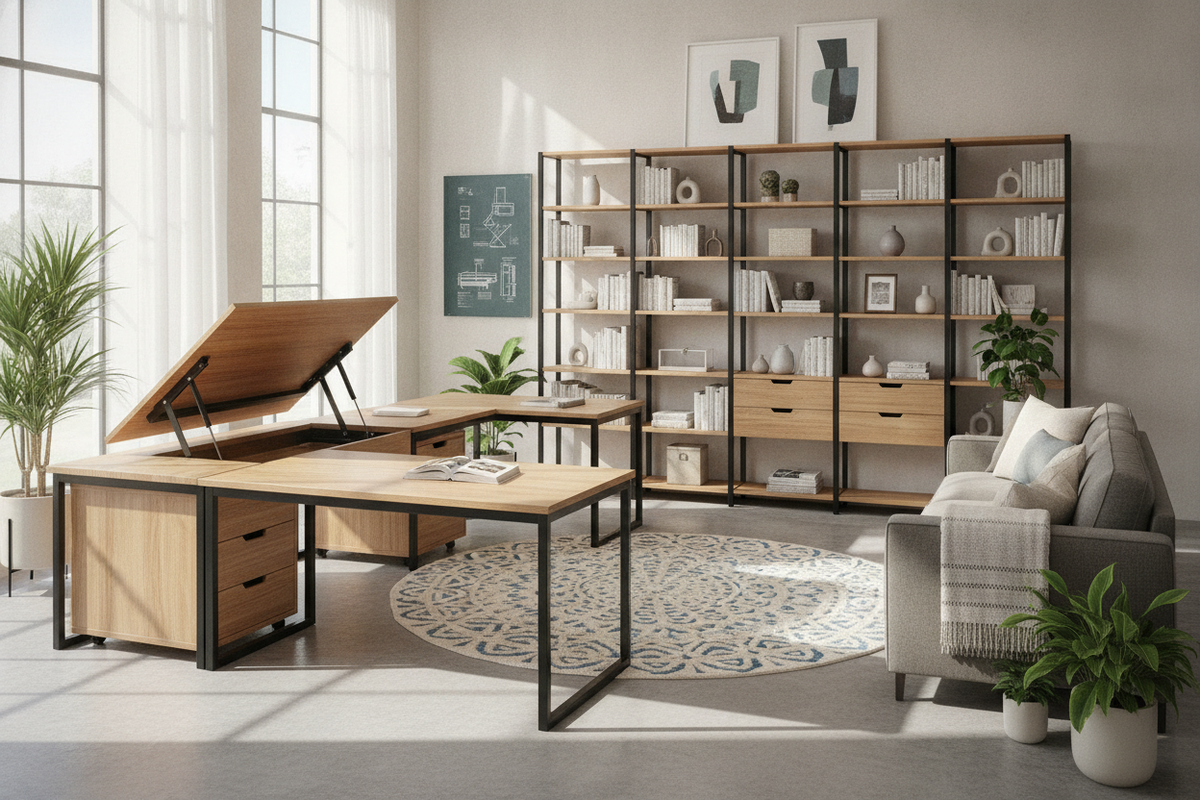
A lift top L shaped desk combines the active posture adjustments of a standing platform with the spacious footprint and organization of a corner workstation. Unlike standard motorized height-adjustable desks that move the entire desktop assembly at once, an L-shaped desk with an integrated lift platform typically divides the surface into dynamic and static zones. This hybrid layout provides dedicated task areas while keeping storage units, stationery, and peripheral devices secure and stationary.
Understanding the Lift Top L-Shaped Desk: Hybrid Mechanics and Dual-Zone Layouts
The core appeal of an l shaped desk lift top design lies in its dual-zone functionality. One primary wing houses the mechanical lifting platform, while the intersecting return wing remains fixed in place. This arrangement delivers several practical benefits for day-to-day office routines:
- Active vs. Static Workzones: The elevating section supports primary input peripherals such as your keyboard, mouse, and main display. The stationary return acts as a stable hub for secondary screens, reference binders, desk lamps, and writing materials that do not need to move.
- Mechanical Linkage Configurations: Built-in lifting mechanisms typically rely on counterbalanced spring systems or pneumatic gas struts. These scissor or parallelogram brackets allow the primary surface to smoothly ascend forward and upward toward the seated user, creating a comfortable standing position.
- Stationary Base Integrity: Because the primary frame and return wing stay anchored to the floor, the desk maintains solid structural balance throughout the lifting motion without shaking loose peripheral equipment.
Dimensional Decision Categories and Spatial Footprint Planning
Choosing the right desk proportions requires balancing your available room square footage against the mechanical clearance required when the lift surface is raised.
When measuring your room, account for the overall length of both wings, the desk depth along each side, and the user seating well. In smaller home offices or multipurpose bedrooms, a compact layout like the 63w L-shaped 3-drawer lift computer desk offers a practical footprint that nests neatly into corners while leaving ample room for an ergonomic office chair to swivel freely.
Beyond horizontal dimensions, vertical and arc clearance is a vital consideration. When counterbalanced lift tops engage, they travel both upward and slightly forward toward the user. Ensure your placement allows for the following clearances:
- Vertical Clearance: Check that elevated monitors will not collide with overhead floating shelves, wall-mounted cabinetry, or low-hanging pendant lights.
- Forward Arc Margin: Verify that there is enough room between the elevated desktop edge and your body when standing, leaving comfortable elbow room without crowding the surrounding walkway.
- Window Trim Alignment: Ensure the rising monitor path does not obstruct window sills or catch on low-hanging window blinds.
Storage Architecture: Integrating Drawers, Shelves, and Legroom
Integrating moving hardware into office furniture requires smart internal storage design. Under-desk space must accommodate lifting brackets and crossbeams without restricting natural legroom or knee clearance when seated.
To maximize utility, many designs locate deep drawer pedestals and filing cabinets directly beneath the stationary return wing. This placement anchors the workstation and keeps heavier supplies from interfering with the mechanical lift section. For expansive setups, choosing a multi-functional configuration like the 71w L-shaped lift computer desk with bookcase adds vertical tiered shelving alongside file drawers, consolidating reference materials, printers, and decorative items into one footprint.
When organizing your storage zones, keep these guidelines in mind:
- Knee Well Depth: Confirm the primary seating area underneath the lift section provides generous clearance for legs and footrests.
- Drawer Accessibility: Position frequently accessed supply drawers under the stationary wing so that files remain accessible even when the primary top is raised.
- Upper Tier Positioning: If your desk includes an attached hutch or open hutch shelving, position tall decorative items on the stationary side to prevent interference with monitor movement.
Room Layout Strategies: Corner Anchors vs. Peninsula Configurations
The positioning of an L-shaped workstation dictates room flow and influences how cleanly cables and hardware blend into the room's decor.
Corner Anchor Placement: Positioning both wings flush against intersecting walls maximizes open floor area in smaller offices. This orientation keeps hardware out of traffic paths and makes it easy to route power cords directly into wall outlets. When setting up a corner layout, confirm the lift top raises away from the wall to prevent monitor screens from scraping wall paint.
Peninsula Room Dividers: In open-concept living rooms or shared office spaces, extending the return wing outward into the room creates an attractive peninsula. This arrangement naturally partitions the room into distinct work and leisure zones while maintaining an open feel.
Dynamic Cable Management: A moving desktop requires thoughtful wire management. Ensure power cords, display cables, and charging leads have adequate slack loop length along the hinge arms. Use flexible cable sleeves or adhesive cord clips along the underside of the lift frame to prevent wires from pinching or binding during height transitions.
Material Selection, Frame Stability, and Assembly Guidelines
A lift top desk experiences regular movement, making material durability and assembly precision essential for long-term reliability.
- Surface Materials: Desktops crafted from durable engineered wood with scratch-resistant laminate finishes resist daily wear, moisture rings, and scuffs while providing a smooth writing surface.
- Counterbalance Stability: Reinforced steel brackets and robust side panels distribute weight evenly across the entire L-shaped frame, keeping the workstation planted firmly during height adjustments.
- Assembly Alignment: During assembly, tighten structural frame bolts evenly before fastening the lifting hinges. Ensuring the moving platform sits square within its recess guarantees quiet, frictionless movement and flush alignment when lowered.
- Periodic Hardware Inspection: Check hinge mounting screws and tension springs periodically to ensure smooth gliding action and sustained balance over time.

Leave a comment
This site is protected by hCaptcha and the hCaptcha Privacy Policy and Terms of Service apply.