

















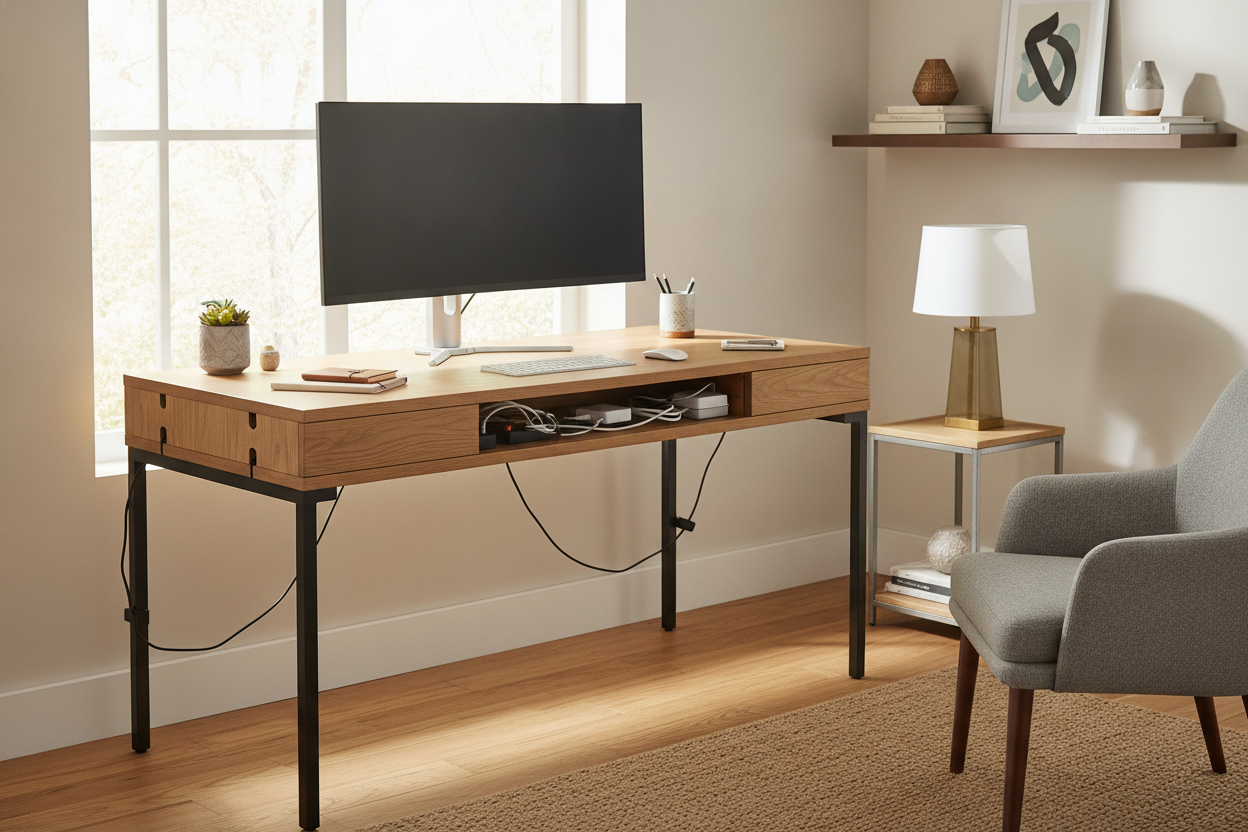
I remember staring at my beautiful mid-century writing desk—a piece of solid walnut I spent way too much on—and feeling a strange, low-simmering rage. It wasn't the furniture's fault, but the black 'spaghetti' of power bricks, HDMI cables, and USB-C cords dangling behind it looked like a tech-demon was trying to crawl out of my floorboards. I realized then that desks with cable management aren't just a luxury for the ultra-organized; they are a fundamental requirement for anyone who wants to work without a visual headache.
- Grommet holes are just the start; you need a tray to actually hold the weight of a power strip.
- Adhesive cable clips will eventually fail, usually at 3 AM, taking your desk's finish with them.
- Integrated power strips save you from the 'wall-to-desk' cord stretch.
- A desk that hides wires makes a small room feel twice as large.
The Myth of the Completely Wireless Home Office
Let's be honest: those Pinterest-perfect home offices are a lie. You see a floating desk with a single, lonely laptop and maybe a succulent. Where is the monitor power cable? Where is the printer? Where is the charger for the phone that took the photo? In the real world, a functional workspace requires a minimum of five to ten cords. Denying this fact is the first mistake we all make. We buy a 'minimalist' table and then act surprised when it looks like a disaster zone ten minutes after we plug in our gear.
The reality is that wires are the veins of a modern office. If you don't have a plan for them, they will dictate the aesthetic of your room. I spent years trying to pretend my setup was wireless, tucking cords behind table legs only for them to pop out the moment I moved my mouse. It’s a cycle of frustration that ends only when you admit that you need a computer desk with cord management designed to handle the mess, not just ignore it.
My Failed Era of Zip Ties, Tape, and Under-Desk Baskets
I have tried every 'life hack' in the book. I bought the 100-pack of industrial zip ties and turned my under-desk area into a rigid, plastic-bound cage. It looked great for exactly four days. Then, my docking station died. I had to perform surgery with a pair of snips, terrified I’d slice through my monitor cable, just to remove one dead piece of hardware. Zip ties are for permanent installations, not for a dynamic home office where tech changes every year.
Then came the double-sided tape era. I tried to stick a heavy surge protector to the underside of my desk. It held for two weeks before the heat from the power bricks melted the adhesive, sending the whole mess crashing onto my feet in the middle of a Zoom call. It is a common desk with storage mistake—we focus so much on hiding pens and paper in drawers that we completely ignore the three-pound weight of cables hanging off the back. I even tried those cheap wire baskets that screw into the underside, but they sagged under the weight of my Mac's power brick, looking like a metal hammock for trash.
What Actually Makes a Good Computer Desk With Cable Management?
A real desk with built-in cable management is more than just a table with a hole in it. You want features that are structural. Look for integrated metal trays that are bolted into the frame. These are designed to hold the weight of three or four 'wall wart' adapters without bending. Some high-end executive desks even feature hollow legs. This is the gold standard; you run the power cord through the leg itself, so the wire literally disappears into the floor.
If you have a multi-monitor setup, you need space. A home office computer desk corner desk with large storage is often the best bet because the 'L' shape creates a natural corner 'dead zone' where you can mount massive cable trays. This gives you ample physical room to route thick DisplayPort cables and hide those bulky power bricks that come with 32-inch monitors. You shouldn't have to be a Tetris master just to plug in your computer.
Beware the Basic 'Desk with Cable Hole' Trap
We’ve all seen it: the desk with cable hole that has a cheap plastic cap. This is the 'bare minimum' of design. If you have two monitors, a keyboard, and a webcam, that two-inch hole is going to be jammed tighter than a New York subway at rush hour. The plastic cap will eventually pop off, get lost, and leave you staring at a jagged circle of MDF. When shopping, look for a desk with wire hole options that include a wide 'trough' or a flip-top lid that spans the entire back of the desk. This allows you to drop cables down at any point, rather than funneling them all into one congested spot.
Finding a Desk That Hides Wires Without Looking Like a Server Rack
The biggest hurdle is finding a modern desk with cable management that doesn't look like it belongs in a corporate IT department. You want your home to feel like a home, not a cubicle. The trick is to look for 'hidden' features. Some of the best designs use a false back panel—a piece of matching wood that sits two inches in front of the actual back, creating a secret chimney for all your wires.
For those who prefer a lighter look, a chic writing computer desk can still be functional if it incorporates a 'tech drawer' or a rear flip-top compartment. These designs allow you to keep your power strip inside the furniture itself. You only have one single cord coming out of the desk to the wall outlet. It maintains that minimalist, airy aesthetic while secretly housing a desk with cable management system that would make a sysadmin jealous. I personally prefer a white desk with cable management for smaller rooms, as the cables (which are often white or light gray now) blend into the shadows of the furniture much better than they do against dark wood.
The Unexpected Psychological Relief of Hidden Cords
It sounds dramatic, but the day I finally set up a desk that hides wires properly, my workday stress plummeted. There is a documented psychological effect called 'visual clutter,' and trailing cables are the worst offenders. They look like unfinished tasks. Every time your eye catches that tangled mess, your brain registers a small 'to-do' item: *I should fix that.*
When you eliminate the visual 'spaghetti,' you create a clear boundary between your tech and your living space. It makes it significantly easier to log off at 5 PM when you aren't staring at the physical manifestation of your digital life. Investing in a home office desk with cable management isn't just about furniture; it's about reclaiming your mental space from the clutter of the modern world.
FAQ
Is a cable tray better than a cable hole?
Yes, 100%. A hole just moves the mess from the top of the desk to the bottom. A desk with cable management tray actually supports the wires and power strips, keeping them off the floor and out of sight.
Can I add cable management to my existing desk?
You can, but it's rarely as clean as a built-in cable management desk. Aftermarket trays often require drilling into your furniture, and they never quite match the weight capacity or the aesthetic of an integrated system.
What should I look for in a desk for a gaming setup?
Gamers usually have more peripherals. Look for a large desk with cable management that specifically mentions a 'power management' or 'cable compartment.' You'll need more room than a standard office worker to account for RGB controllers and high-end audio gear.

Leave a comment
This site is protected by hCaptcha and the hCaptcha Privacy Policy and Terms of Service apply.