

















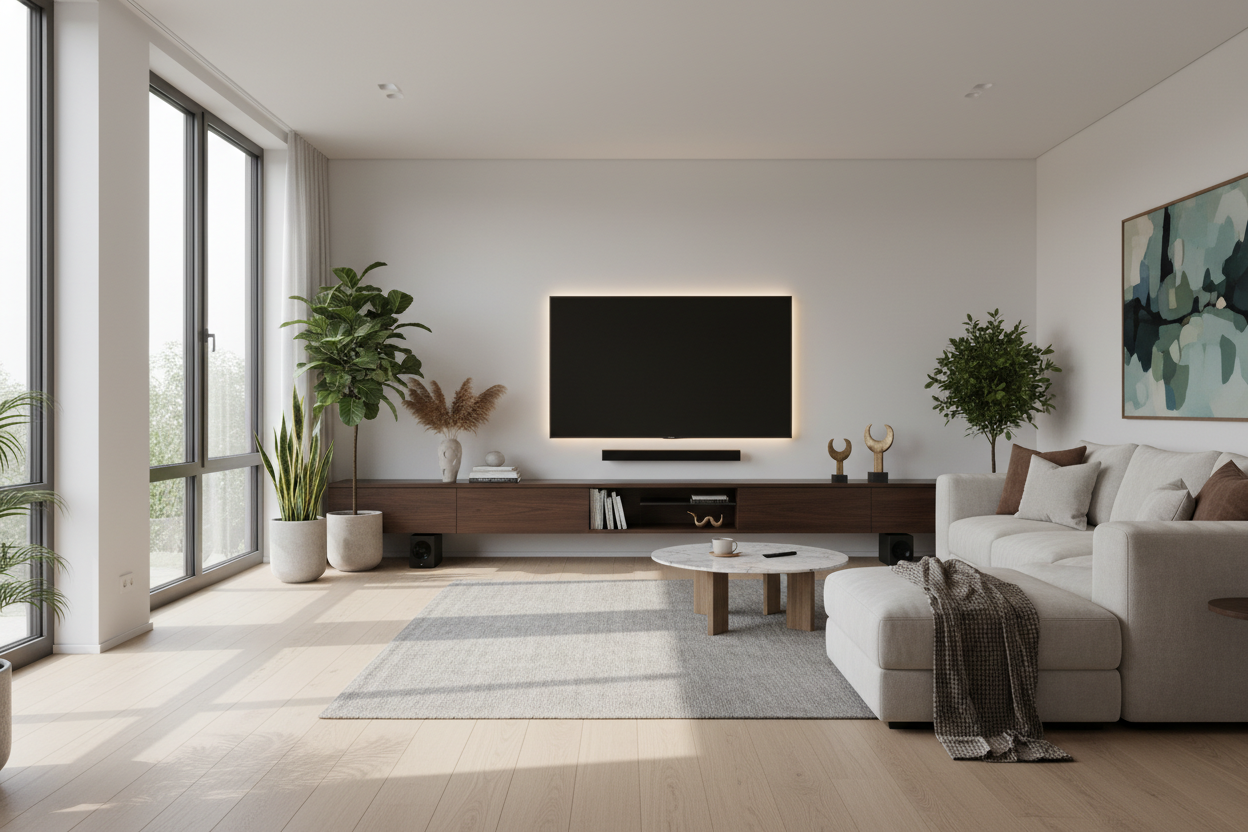
I spent three months obsessing over the perfect linen sofa only to realize my living room felt like a cold, sterile cave the second I turned the TV on at night. The harsh glare from my 65-inch OLED was giving me a tension headache by the second episode of whatever I was binging. I knew I needed an entertainment light, but I was terrified of my space looking like a teenager's bedroom on a 3 AM energy drink bender.
We have all seen those setups on social media where the wall behind the TV looks like a neon rave. It is distracting, it is loud, and it usually involves a mess of wires that would make a cable technician weep. I wanted the functional benefits of bias lighting without the 'Twitch streamer' aesthetic.
- Bias lighting reduces eye fatigue by softening the contrast between the bright screen and a dark wall.
- Stick to 6500K (daylight) or warm white settings; avoid the rainbow strobe effects if you want to keep things classy.
- Hide the light source—if you can see the individual LED beads, you have failed the design test.
- Use your furniture to bounce light rather than sticking adhesive strips directly to your expensive electronics.
The Problem With Most TV Lighting Today
The market is currently flooded with $15 LED strips that promise a 'theatrical experience' but actually just deliver a headache. These cheap kits usually come with a flimsy plastic remote that offers 44 different colors, 40 of which are shades of neon green or electric purple that no one should ever see in a grown-up living room. It has given the whole concept of a lighting entertainment system a bad reputation among people who actually care about their interior design.
When these lights are set to 'color-sync' mode, they flash and jump with every frame change on the screen. It is supposed to be immersive, but in reality, it is just visually noisy. If I am watching a moody period drama, I do not want my wall flickering like a strobe light because a candle flickered on screen. For those of us who appreciate a curated home, these aggressively bright, poorly diffused LEDs are the equivalent of putting a spoiler on a vintage Mercedes. We want the glow, not the circus.
Why You Actually Do Need a Backlight
Despite my hatred for the neon gamer vibe, I am a huge advocate for bias lighting. Your eyes are not designed to stare at a small, incredibly bright rectangle in a pitch-black room. It causes your pupils to constantly dilate and contract, leading to that 'tired eye' feeling after a long movie. By adding a soft wash of light behind the screen, you create a middle ground for your vision to rest on.
Beyond the health of your eyeballs, a proper entertainment light actually makes your TV look better. It is a trick of perception: when the area around the screen is illuminated, the blacks on your screen appear deeper and the colors more vibrant. It is the cheapest way to make a mid-range television look like a high-end panel. You just have to be smart about how you implement it.
Getting the Color Temperature Right
If you want a professional look, you need to ignore the 'Color' button on your remote. Stick to 6500K if you want the most color-accurate experience for movies; this is the industry standard for 'True White.' However, if your living room is filled with warm wood tones and soft textures, a 3000K 'Warm White' often feels more integrated and less like a laboratory. Avoid anything with a blue tint, as it will make your space feel cold and uninviting.
How to Hide the Bulbs (Because Glare is the Enemy)
The golden rule of lighting is that you should see the effect, never the source. If you can see the individual glowing dots of an LED strip reflected in your floor or peeking out from the side of the TV, the illusion is ruined. I always recommend placing your light strips at least two to three inches in from the edge of the TV frame. This allows the light to spread and diffuse against the wall before it reaches your line of sight.
If you have a floating media console, you can also run the strips along the back edge of the furniture. When you upgrade your entertainment center, look for pieces that have a small gap between the back panel and the wall. This is the perfect 'light pocket' to tuck away cables and strips so that the glow feels like it is emanating from the architecture itself, rather than a sticky tape job.
Using Your Existing Furniture for Ambient Glow
You do not always have to stick things to the back of your TV. Some of the most sophisticated media rooms I have seen use surrounding furniture to provide that necessary ambient light. For instance, if you have shelving flanking your screen, using elegant display cabinet lighting can provide enough peripheral glow to satisfy your eyes without ever touching the television itself.
I have recently been experimenting with display cases with adjustable lighting placed on either side of a media console. The light spills out from the glass doors and washes the side walls, creating a wide, cinematic feel that is much more 'boutique hotel' and much less 'basement LAN party.' It is about layers. A single strip behind the TV is fine, but light coming from a beautiful piece of furniture feels intentional and high-end.
Personal Experience: The Sync Box Disaster
I once dropped nearly $250 on a fancy sync box that was supposed to make my lights mimic the colors on the screen in real-time. It was a disaster. Not only did it add three extra cables to my already messy setup, but the lag was just enough to be annoying. Every time a character walked off-screen, the wall would turn blue half a second too late. It was so distracting I couldn't focus on the movie. I eventually ripped it all out and replaced it with a simple, static warm-white strip that I plugged directly into the TV's USB port. It turns on and off with the TV, costs a fraction of the price, and looks infinitely more sophisticated.
Frequently Asked Questions
Does bias lighting work if my walls are dark?
Yes, but you will need a higher brightness setting. Dark navy or charcoal walls absorb light, so the 'glow' will be more subtle. It actually looks incredibly moody and high-end on dark paint.
Can I just use a lamp next to the TV?
You can, but it often creates a reflection on the screen itself. The benefit of a dedicated entertainment light is that it is positioned behind the screen, so there is zero chance of annoying glare or hotspots on the glass.
Do I need an app to control it?
Honestly? No. The best setups are the ones you don't have to think about. Use a strip that plugs into your TV's USB port so it automates itself. If you have to open an app every time you want to watch the news, you will eventually stop using it.


Leave a comment
This site is protected by hCaptcha and the hCaptcha Privacy Policy and Terms of Service apply.