

















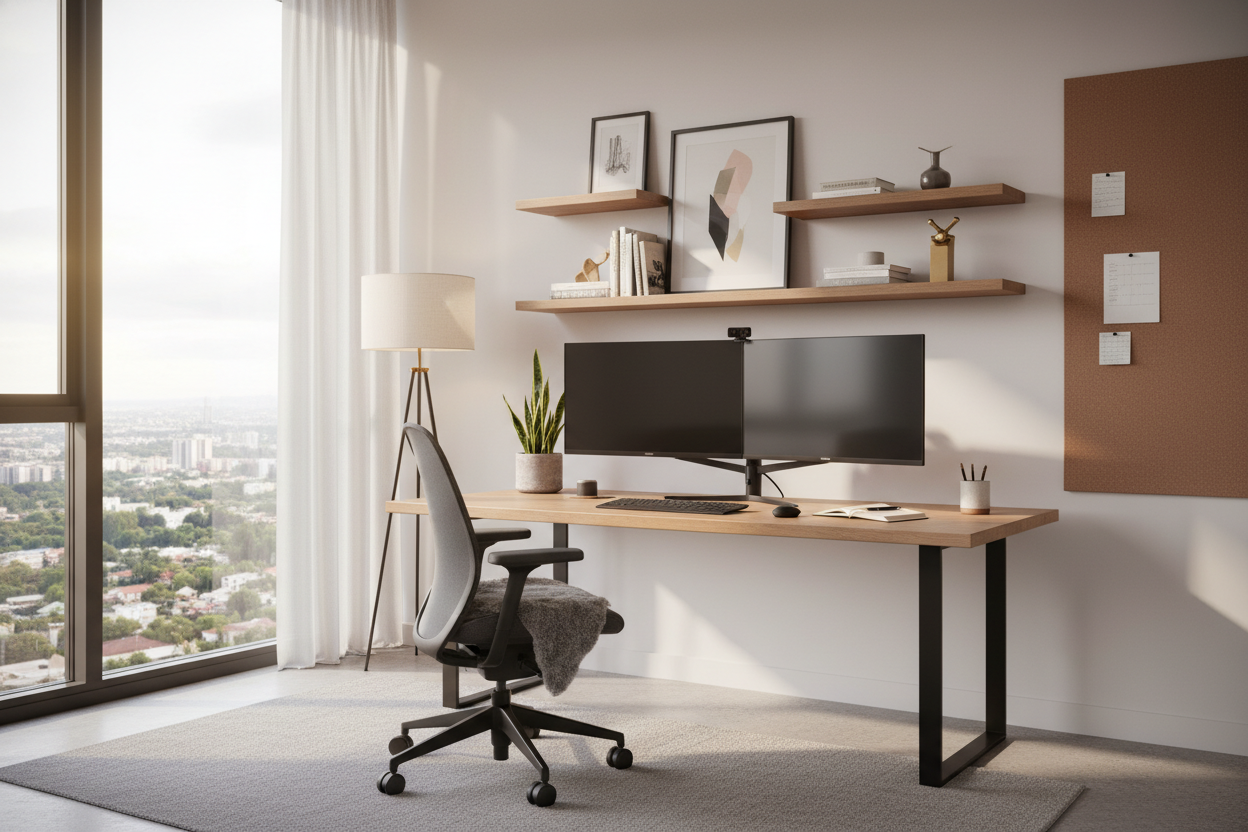
We have all attempted to work from a dining table or a makeshift corner, only to realize that productivity suffers when comfort is compromised. The difference between a chaotic workspace and a sanctuary of focus lies entirely in the home office configuration. As an interior designer, I often see clients prioritize aesthetics over function, resulting in spaces that look beautiful in photos but fail during an eight-hour workday. This guide moves beyond basic furniture placement to help you curate a professional, high-performance environment right at home.
Quick Decision Guide: The Essentials
If you are planning your layout, prioritize these four pillars to ensure your home office setup stands the test of time:
- Ergonomic Triangle: The relationship between your eyes, hands, and lower back must dictate your furniture choices.
- Lighting Layers: Combine ambient overhead light with focused task lighting to reduce eye strain.
- Surface Depth: Ensure your desk is at least 30 inches deep if you use a home office monitor setup with dual screens.
- Traffic Flow: Leave at least 36-48 inches behind your chair for movement and visual breathing room.
Structuring the Ultimate Home Office Setup
Creating the perfect home office setup requires a blend of architectural planning and furniture expertise. It is not just about buying a desk; it is about curating an ecosystem.
The Desk: Materiality and Scale
The centerpiece of any work from home desk setup is the surface itself. When selecting materials, consider longevity and tactile experience. Solid hardwoods like walnut or white oak offer warmth and durability, aging gracefully with use. However, for a cool office setup that leans modern, matte-finish laminates or Fenix NTM materials resist fingerprints and offer a soft-touch feel.
Avoid the common mistake of undersizing. For a robust home computer setup, you need ample real estate. A standard 48-inch desk often feels cramped once you add peripherals. Aim for 60 inches or wider if your room allows, giving you space for both digital work and analog tasks like sketching or reviewing documents.
Ergonomics: Beyond the Chair
While a high-quality task chair is non-negotiable, the best home office set ups consider the entire body's position. Your home office with computer integration should allow your elbows to rest at a 90-degree angle. This often means investing in a height-adjustable desk or an articulating keyboard tray. If you are looking for work from home desk setup ideas that save your back, start with a monitor arm. Getting the screen off the desk surface not only clears clutter but allows for precise eye-level alignment.
Visual Balance and Lighting
Lighting is the unsung hero of awesome home office setups. Relying solely on a ceiling fixture creates harsh shadows. Instead, layer your lighting. Use a warm desk lamp for task work and consider bias lighting (LED strips) behind your monitor to reduce contrast strain. This creates a cool home office setup that is also gentle on your circadian rhythm.
Styling and Organization
To achieve a luxury look, organization must be seamless. Coolest home office setups often feature hidden cable management. Look for desks with integrated grommets or modesty panels that hide the "spaghetti" of wires. When setting up home desk accessories, follow the rule of three: group items (like a plant, a lamp, and a clock) to create a pleasing visual vignette without cluttering your functional zone.
My Personal Take on Home Office Configuration
I learned a hard lesson early in my career regarding texture. I once designed a home work station setup for a client using a gorgeous, rough-hewn reclaimed wood table. It looked incredible—definitely one of those coolest office setup candidates for Instagram. However, two weeks later, the client called. They couldn't write on a piece of paper without the pen punching through or the lines going wobbly because of the wood grain.
I had to commission a custom leather blotter to fix the surface issue. Since then, whenever I advise on ideas for setting up a home office, I always check the "writing factor." If you fall in love with a textured desk, factor in a high-quality desk pad immediately. It’s a small detail, but in a work set up where you spend 40 hours a week, those tactile frustrations add up fast.
Frequently Asked Questions
How do I create a functional office in a small bedroom?
For a simple home office setup in tight quarters, utilize vertical space. Wall-mounted shelving above the desk draws the eye up and provides storage without eating floor space. Floating desks are also excellent office setup ideas at work for small footprints as they keep the floor visible, making the room feel larger.
Is a standing desk worth the investment?
Absolutely. The ultimate office setup prioritizes movement. Even if you only stand for 15 minutes an hour, the ability to shift posture prevents static loading on your spine. It turns a static home desk setup into a dynamic workstation.
What is the best position for the desk?
Ideally, position your desk to face the door (the "command position") but perpendicular to a window. Facing a window directly causes glare on your home office monitor setup, while having a window behind you creates a silhouette effect on video calls. This layout is a staple of great office setups.

Leave a comment
This site is protected by hCaptcha and the hCaptcha Privacy Policy and Terms of Service apply.