

















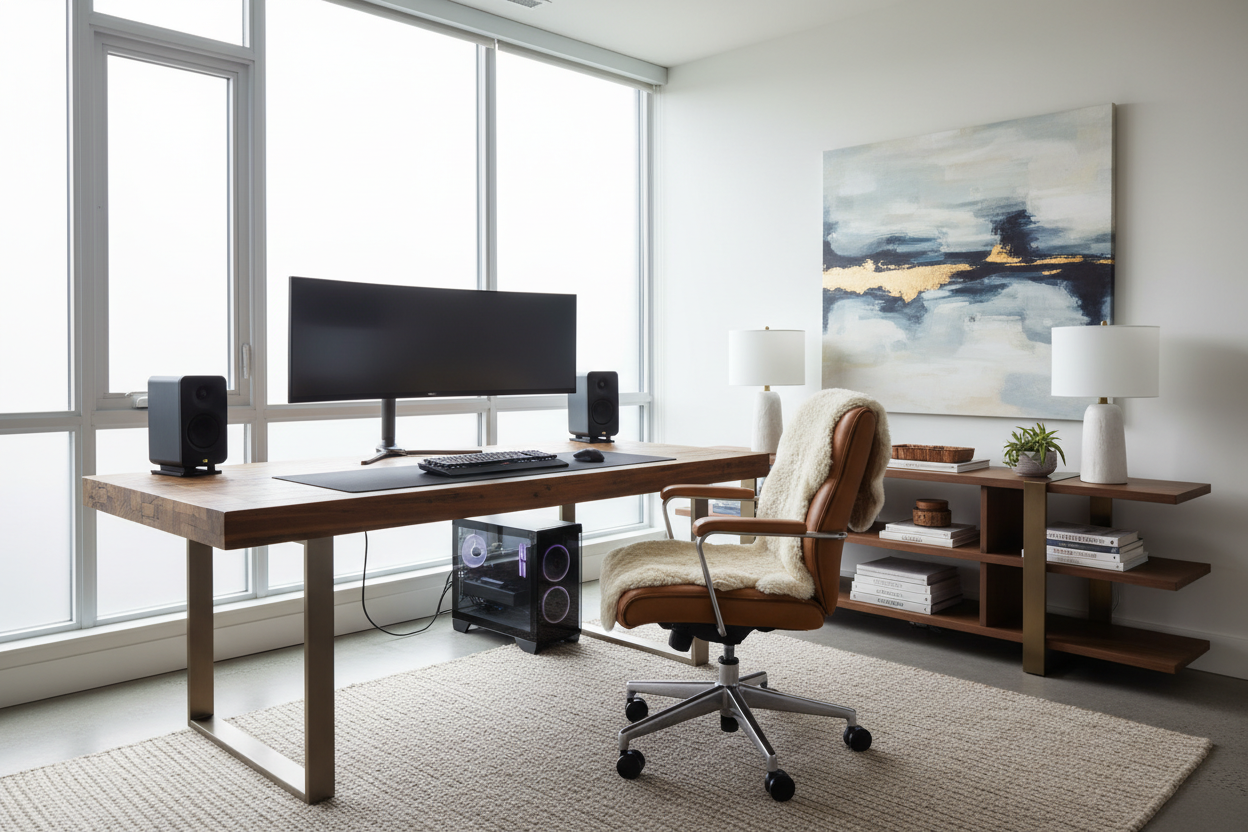
One of the most frequent challenges I encounter when consulting on residential projects is the clash between technology and tranquility. Clients want a high-performance workspace, but they are terrified that monitors, towers, and tangles of cables will disrupt the carefully curated aesthetic of their living quarters. A sophisticated computer setup in home requires more than just buying a desk and a chair; it demands a strategic balance of ergonomics, materiality, and spatial planning.
Key Features to Look For
Before committing to a layout or purchasing furniture, consider these foundational elements to ensure your workspace adds value to your interior rather than detracting from it:
- Material Integrity: Prioritize solid hardwoods (walnut, white oak) or high-grade veneers over hollow-core laminates for longevity and tactile warmth.
- Ergonomic Silhouette: Look for chairs that offer lumbar support without the bulky, aggressive aesthetics of racing-style gaming chairs.
- Cable Management Architecture: Ensure desks have built-in grommets, modesty panels, or hidden channels to maintain visual silence.
- Lighting Temperature: Aim for 3000K-4000K lighting to reduce eye strain while matching residential ambient light.
- Spatial Flow: The setup should not impede traffic paths or block natural light sources.
Curating the Foundation: Desk Material and Placement
The desk is the anchor of your in-home computer setup. In luxury design, we look at the desk not just as a surface, but as a piece of architectural furniture. If your workspace is part of a shared area, such as a living room or master suite, steer clear of industrial-looking metal frames unless your home leans heavily into a brutalist or loft aesthetic.
Solid Wood vs. Veneer
For a tactile, high-end feel, solid wood is the gold standard. It ages beautifully and can be refinished. However, high-quality architectural veneers are often more stable in fluctuating humidity. When inspecting a desk, run your hand along the underside of the top; a rough, unfinished underside often indicates a piece that was cut from production costs, whereas a finished underside suggests a piece designed to float in a room.
The Art of Visual Balance and Ergonomics
A common mistake in a home computer set up is ignoring the vertical plane. If you place a heavy, dark monitor on a delicate, spindly desk, the visual weight feels precarious. Balance the visual mass of your technology with a desk that has substantial legs or volume.
Seating with Sophistication
The era of the unsightly "office chair" is over. We now have access to performance seating wrapped in boucle, leather, or velvet that hides advanced ergonomic mechanisms. Look for chairs with a mid-century modern silhouette or a sleek, high-back profile that complements your room's drapery and rugs. The goal is for the chair to look inviting, not utilitarian.
Lighting: Layering for Function and Mood
Standard overhead recessed lighting casts harsh shadows that are detrimental to screen work. Instead, layer your lighting. Start with ambient light (a floor lamp or dimmable sconces), add task lighting (a focused, adjustable desk lamp with a brass or matte finish), and consider bias lighting behind your monitor to reduce contrast strain. This layering creates a "pool of light" that defines the workspace zone without harsh boundaries.
My Personal Take on computer setup in home
I learned a hard lesson about finishes during a project for a loft in Tribeca. We designed a stunning, custom built-in desk painted in a flat, matte black to match the window mullions. It looked incredible on installation day. However, within two weeks, the client called me. The issue? Finger oils.
Matte finishes, specifically on laminates or painted wood where your wrists rest, are notorious for showing every single smudge and oil mark. It looked perpetually dirty. We ended up having to install a leather desk blotter to cover the high-traffic area. Since then, I always advise clients to choose a wood grain or a textured finish for the primary work surface. It hides dust and wear significantly better than solid matte colors. Also, never underestimate the stiffness of a brand-new ergonomic chair; I once bought a high-end mesh chair that took a full three months to "break in" to a comfortable level of give. Patience with quality materials is key.
Conclusion
Designing a computer setup in home does not mean sacrificing your personal style. By selecting materials that age gracefully, prioritizing seating that looks as good as it feels, and managing your lighting layers, you can create a workspace that feels like a natural extension of your home. Treat your technology as part of the decor, and the result will be both functional and beautiful.
Frequently Asked Questions
How deep should a desk be for a proper computer setup?
For a comfortable home computer set up, aim for a desk depth of at least 24 to 30 inches. This allows you to place the monitor at an arm's length away, preventing eye strain, while leaving enough room for a keyboard and wrist support.
What is the best way to hide cables in an open-concept room?
If your desk is not against a wall, use a desk with a "modesty panel" or integrated cable spine (resembling a vertebrae) that runs down the leg. Additionally, use Velcro ties rather than zip ties to bundle cords; they look cleaner and are easier to adjust later.
Can I use a dining chair for my computer setup?
While aesthetically pleasing, dining chairs generally lack the lumbar support and adjustability required for long-term sitting. If you must use a dining chair for style, ensure you add a dedicated lumbar pillow and limit use to short bursts of work.

Leave a comment
This site is protected by hCaptcha and the hCaptcha Privacy Policy and Terms of Service apply.