

















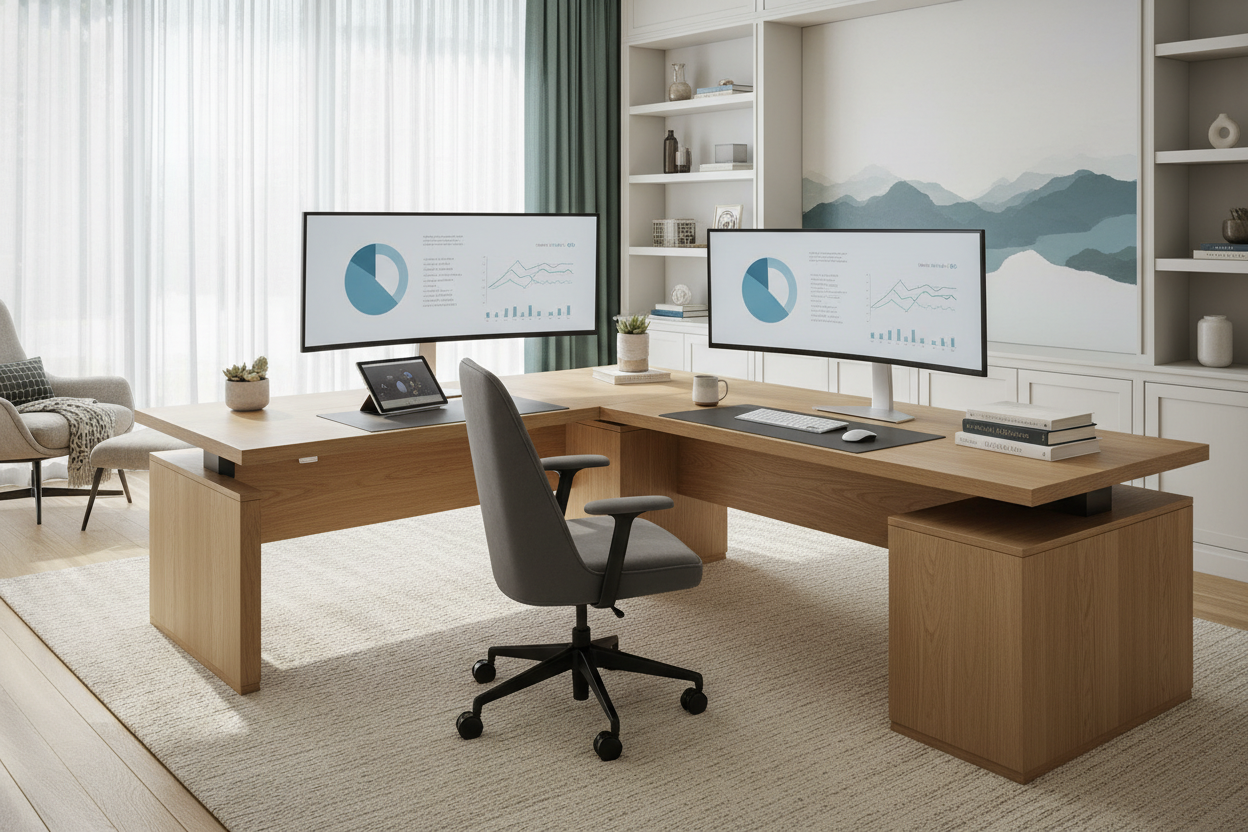
We have all sat in that makeshift workspace—perhaps a dining table that wobbles slightly or a sofa that feels comfortable for ten minutes but wrecks your posture for ten hours. When clients ask me, does remote work decrease productivity, I rarely point to their time management skills. Instead, I look at their chair, their lighting, and the flow of their room. The truth is, productivity isn't just about willpower; it is about environmental psychology and ergonomic support.
Quick Decision Guide: The Productivity Checklist
Before you blame the remote model for a slump in output, evaluate your physical environment against these core design principles. This checklist ensures your space supports high-performance work:
- Ergonomic Foundation: Does your seating offer adjustable lumbar support and seat depth? A lack of support increases fatigue by 40%.
- Lighting Layers: Are you relying solely on overhead cans? You need task lighting (3000K-4000K) to reduce eye strain.
- Zoning Definitions: Is there a physical or visual boundary separating 'living' from 'working'?
- Surface Tactility: Are you working on glass (cold, reflective) or wood/matte laminate (warm, sound-absorbing)?
- Visual Noise: Is the space cluttered? Minimalist layouts reduce cognitive load.
The Ergonomic Equation: Chair vs. Sofa
When comparing the productivity work from home vs office environments, the most glaring disparity is usually the seating. Corporate offices spend thousands on contract-grade furniture designed for 8-hour usage. In the home, we often prioritize aesthetics over function.
To maintain high output, your chair acts as the engine. Look for a synchronous tilt mechanism that moves with you. If you are slumping, your oxygen intake drops, and brain fog sets in. I always advise clients to invest in a chair with a breathable mesh back or high-quality fabric that regulates temperature. Leather is luxurious, but poor-quality bonded leather can trap heat, making you restless by 2 PM.
Spatial Zoning: Creating a Mental Commute
One of the reasons people ask is work from home productive is the bleeding of boundaries. In interior design, we use 'zoning' to create psychological separation. If you don't have a dedicated room, use a rug to define the office area or position a console table behind your desk to anchor the space.
This layout strategy creates a 'visual commute.' When you step onto the rug or sit behind the console, you are at work. When you step off, you are home. This separation is crucial for mental recovery, which directly fuels the next day's productivity.
Materiality and Focus: The Hidden Factor
Work from home productivity studies often overlook the tactile experience. However, the materials you touch impact your stress levels. I often steer clients toward solid wood or high-quality veneers for desk surfaces. Natural wood grain has a biophilic effect, subtly lowering cortisol levels compared to sterile plastic or cold glass.
Acoustics and Distraction
Hard surfaces bounce sound, creating echoes that fatigue the brain during Zoom calls. To mitigate this, introduce soft textures. A wool area rug, upholstered occasional chair, or even heavy linen drapes can dampen noise, making the productivity of work from home setups rival professional acoustic treatments.
My Personal Take on does remote work decrease productivity
I recently redesigned a home office for a client who was convinced they needed to return to the corporate office to get anything done. They were working off a beautiful, mid-century modern teak dining table. It looked stunning, but the apron of the table was too low, forcing their legs into an awkward angle, and the chair had zero lumbar support.
Here is the unpolished truth: We swapped the vintage table for a height-adjustable desk with a matte walnut finish (no glare from the window) and brought in a technical task chair. The game-changer, however, was something small—a felt desk pad. It stopped their keyboard from clacking and kept the surface warm. Two weeks later, the client told me their afternoon fatigue had vanished. It wasn't that they couldn't work remotely; it was that their body was exhausted from fighting their furniture. The 'decrease' in productivity was actually just physical discomfort disguised as distraction.
Conclusion
So, does remote work decrease productivity? Only if the design fails the user. By prioritizing ergonomics, establishing clear zones, and selecting materials that reduce cognitive load, you can create a sanctuary of focus. Treat your home office furniture not as decor, but as a tool for success.
Frequently Asked Questions
What is the ideal desk depth for productivity?
For a standard setup with a laptop and monitor, aim for a depth of at least 24 to 30 inches. This allows you to maintain the proper focal distance from your screen (about an arm's length) to prevent eye strain.
Does lighting really affect work from home productivity?
Absolutely. Poor lighting causes eye fatigue and headaches. Layer your lighting: use ambient light for the room and a dedicated task lamp with a CRI (Color Rendering Index) of 80+ to keep colors true and eyes relaxed.
How do I fit a productive workspace in a small apartment?
Focus on verticality. Use wall-mounted shelving above a floating desk to keep the floor clear. Choose a chair with a lighter visual profile (like a mesh back) so the room doesn't feel crowded, which helps maintain a clear head.


Leave a comment
This site is protected by hCaptcha and the hCaptcha Privacy Policy and Terms of Service apply.