

















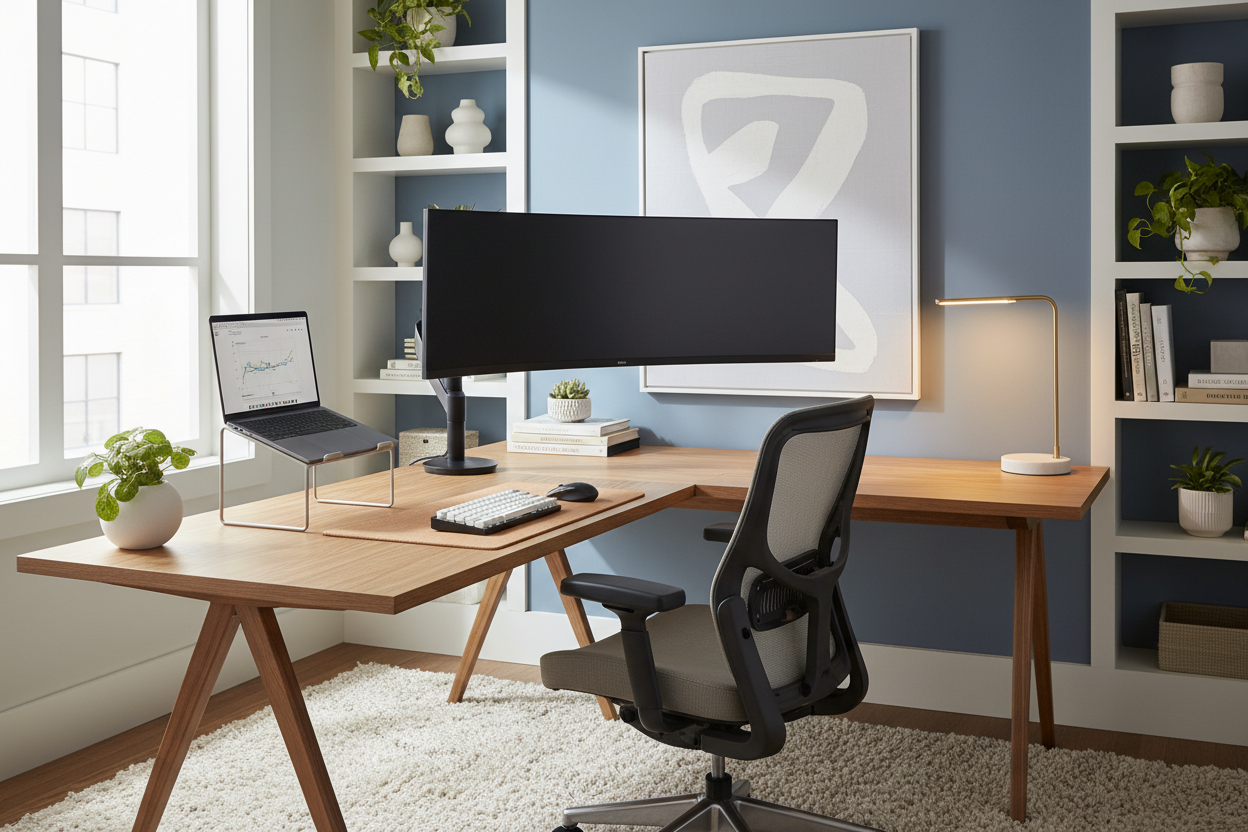
One of the most frequent requests I receive from clients isn't just about choosing a beautiful mahogany desk or a mid-century modern chair; it is about functionality. Specifically, they want to know the best desk setup for laptop and monitor integration that doesn't sacrifice the room's visual integrity. We have all seen workspaces that look cluttered with cables or feel disjointed. The challenge lies in harmonizing the sleek, portable nature of a laptop with the static, dominant presence of an external monitor.
In this guide, we will move beyond basic utility. I will walk you through how to curate a workspace that respects ergonomic principles while maintaining the sophistication of a high-end showroom.
Key Elements of a Functional Workspace
- Desk Depth: Ensure your desk is at least 24–30 inches deep to accommodate the monitor stand and keyboard without cramping your wrists.
- Visual Hierarchy: The monitor should be the focal point, with the laptop serving as a secondary screen or docked out of sight.
- Material Durability: Choose solid wood or high-grade laminate that can withstand the clamp pressure of monitor arms.
- Lighting Layers: Combine ambient room lighting with focused task lighting to reduce screen glare and eye strain.
- Cable Management: Integrated grommets or under-desk trays are essential for maintaining a clean silhouette.
Mastering the Layout and Ergonomics
When planning how to set up desk with laptop and monitor, spatial flow is paramount. A common error is placing the laptop directly in front of the user with the monitor off to the side. This forces a constant neck rotation that leads to fatigue.
For a balanced design, position your external monitor directly in front of you, roughly an arm's length away. The top of the screen should align with your eye level. Place your laptop on a stand adjacent to the monitor, raising it to the same height. This creates a seamless visual horizon, allowing your eyes to glide between screens rather than jumping up and down.
The Monitor Arm: A Designer's Secret
If your budget allows, I always recommend swapping the factory stand for a VESA-mounted monitor arm. From a design perspective, this introduces 'negative space' beneath the screen, making the desk feel larger and less cluttered. It also allows for precise adjustments that static stands cannot offer.
Material Selection and Visual Weight
The furniture itself dictates the success of your setup. When browsing monitor and laptop setup ideas, pay attention to the desk's surface material. A setup involving heavy tech gear requires a substantial foundation.
Avoid thin particle board desks if you plan to use a clamp mount; the pressure can crack the veneer over time. Instead, opt for solid oak, walnut, or a high-density commercial laminate. These materials not only provide structural integrity but also add warmth and texture to counteract the cold, plastic aesthetic of the technology.
My Personal Take on Best Desk Setup for Laptop and Monitor
I want to share a lesson I learned the hard way during a home office renovation for a client in downtown Chicago. We selected a stunning, slim-profile glass desk—it looked architectural and airy. However, once we installed a heavy-duty monitor arm for their ultrawide screen, we realized the glass couldn't handle the torque of the clamp without risking a shatter.
We had to pivot to a wall-mounted monitor solution, which involved drilling into brick—a messy and expensive change order. Since then, I always check the "lip" of the desk. I personally use a 1.5-inch thick solid walnut slab. It is robust enough to take a heavy monitor arm clamp without bowing, and honestly, the way the wood grain has developed a patina around my mouse pad area over the last three years adds a character that a pristine glass or melamine surface just can't replicate. Always prioritize the substrate strength before the silhouette.
Conclusion
Creating a refined workspace is about balancing the technical requirements of your hardware with the tactile beauty of your furniture. By prioritizing depth, alignment, and quality materials, you can transform a chaotic tech pile into a curated zone of productivity. Treat your desk not just as a utility, but as a piece of architecture within your home.
Frequently Asked Questions
What is the ideal desk depth for a laptop and monitor setup?
I recommend a depth of at least 24 inches, though 30 inches is ideal. This depth allows you to place the monitor at the correct focal distance while leaving ample room for a keyboard, mouse, and a notepad without the space feeling claustrophobic.
Should I keep my laptop open or closed when using a monitor?
If you need dual screens, keep it open on a riser to align with your monitor. If you want a minimalist, focused aesthetic (or "clamshell mode"), dock the laptop vertically on a stand to save surface area and reduce visual noise.
How do I hide the cables in an open-back desk?
Use a spine cable manager that runs from the desk surface to the floor, mimicking the desk leg. Additionally, mounting a power strip to the underside of the desk ensures that only one single power cord needs to run to the wall outlet, keeping the silhouette clean.


Leave a comment
This site is protected by hCaptcha and the hCaptcha Privacy Policy and Terms of Service apply.