

















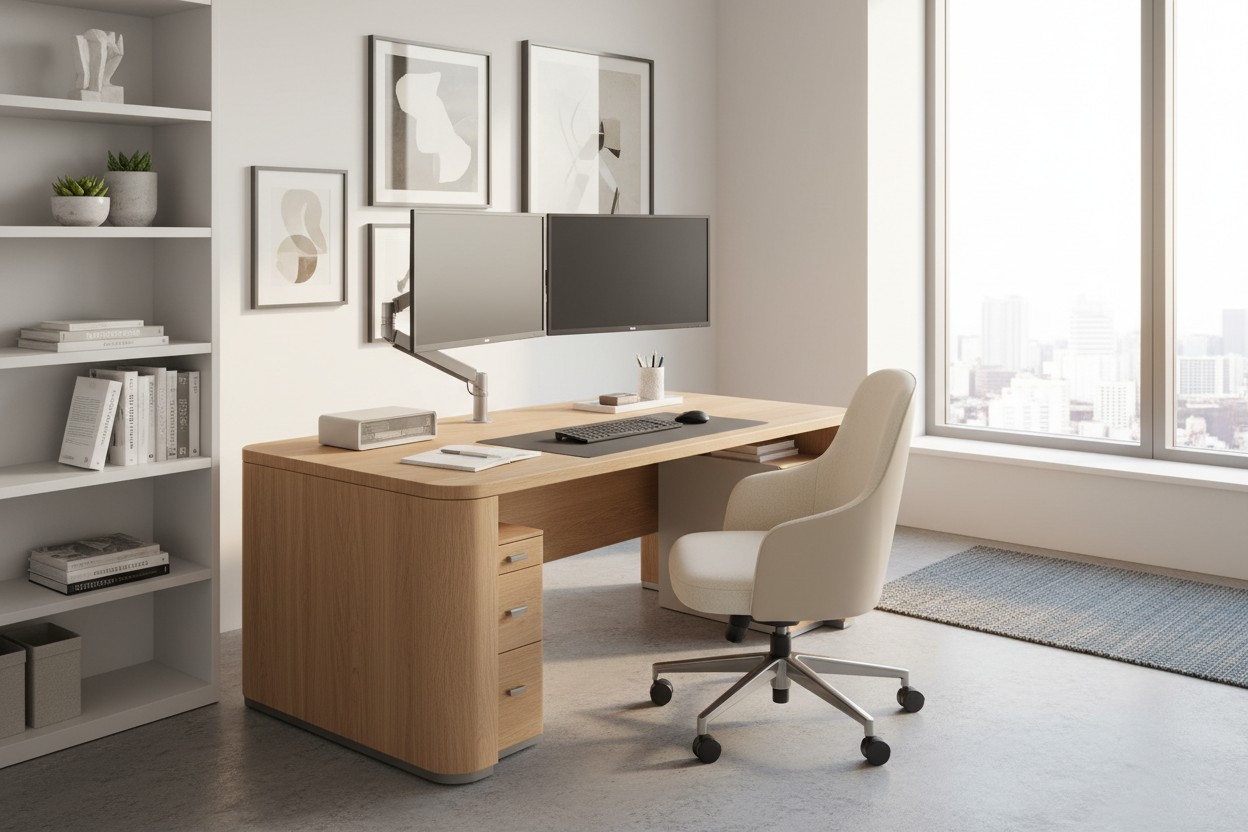
You are likely reading this because your dining table has ceased to be a place for meals and has officially morphed into a clutter of cables and coffee cups. As an interior designer, I see this constantly. Finding the best desk for remote work is not merely about buying a surface to type on; it is about curating a piece of furniture that anchors your workflow while respecting the aesthetic integrity of your home. A desk should command the room without overpowering it, balancing ergonomic necessity with visual sophistication.
Key Features to Look For
- Material Integrity: Prioritize solid wood or high-grade veneer over particle board for longevity and tactile warmth.
- Ergonomic Adaptability: Look for height-adjustable options or standard heights (29-30 inches) that align with your seating.
- Surface Area & Depth: Ensure a minimum depth of 24 inches to accommodate monitors without causing eye strain.
- Visual Weight: Choose a silhouette (legs vs. block) that matches the scale of your room to avoid a cramped look.
- Cable Management: Integrated grommets or channels are essential for maintaining a clean, minimalist look.
Choosing the Right Material: Texture and Durability
When selecting a desk for remote work, the tactile experience is often overlooked. You will be touching this surface for eight hours a day. Glass desks, while modern and excellent for small spaces due to their transparency, can feel cold and clinical. They also create acoustic reflections that can be annoying during conference calls.
For a sophisticated home office, I almost always recommend solid wood or a high-quality wood veneer. Walnut and white oak are currently dominating the design world because they bring organic warmth to a tech-heavy environment. If you are looking for the best desk for remote workers who write manually, wood offers a "give" that is more comfortable than metal or glass. However, be wary of softwoods like pine, which will dent the moment you press down on a ballpoint pen.
Ergonomics Meets Aesthetics
The "sit-stand" revolution has complicated interior design. While highly functional, many standing desks look like industrial machinery. If you require a standing option, look for manufacturers that conceal the motorized legs within wood cladding or offer "executive" style lifting desks.
The Depth Dilemma
A common mistake is purchasing a console table masquerading as a desk. These are often only 18 to 20 inches deep. For a laptop, this is passable. However, if you use an external monitor, a shallow depth forces the screen too close to your face. The best desk for remote work must have a depth of at least 24 to 30 inches, allowing for proper focal distance and space for a keyboard and wrist rest.
Visual Balance and Room Placement
Consider the "silhouette" of the furniture. In a smaller multi-purpose room, a desk with slender legs (mid-century modern style) allows light to pass underneath, making the room feel larger. Conversely, a desk with heavy cabinetry or block legs adds "visual weight" and serves as a focal point, best reserved for dedicated office rooms. When advising clients, I always suggest floating the desk in the room—facing the door—rather than pushing it against a wall. This command position elevates the feeling of authority and openness.
Lessons from My Own Projects
I want to share a specific detail regarding the "wobble factor" that I learned the hard way. A few years ago, I specified a sleek, single-pedestal standing desk for a client who insisted on a minimalist look. It looked stunning in photos.
However, two weeks later, the client called me. Every time he typed vigorously or leaned on the desk while standing, the monitor would shake slightly. It wasn't a structural failure, but that micro-movement induced motion sickness and broke his concentration. I realized then that mass matters. Now, when I hunt for the best desk for remote work involving standing mechanisms, I physically test the stability at the maximum height extension. If you are buying online, look specifically for "crossbar support" or heavy steel bases. That extra weight in the base is the difference between a frustrating workday and a solid, productive one.
Conclusion
Investing in the right workspace is an investment in your daily mindset. By prioritizing material quality, appropriate scale, and stability, you ensure your workspace remains a place of focus rather than frustration. Don't settle for temporary solutions; choose a piece that ages beautifully alongside your career.
Frequently Asked Questions
What is the ideal desk size for dual monitors?
To comfortably fit dual monitors without the setup looking cluttered, aim for a width of at least 55 to 60 inches. This provides enough lateral space for the screens and necessary peripherals like speakers or a task lamp.
How do I protect a wood desk from scratches and spills?
Always use a high-quality desk pad (leather or felt). Not only does this define your "active" work zone, but it also protects the finish from heat, condensation, and scratches from equipment.
Should I choose a drawer-less desk or one with storage?
If you are prone to clutter, a drawer-less desk forces you to stay organized and digitize documents. However, if your role requires physical files, opt for a desk with a detached mobile pedestal so you can move the storage out of sight when not in use.

Leave a comment
This site is protected by hCaptcha and the hCaptcha Privacy Policy and Terms of Service apply.