

















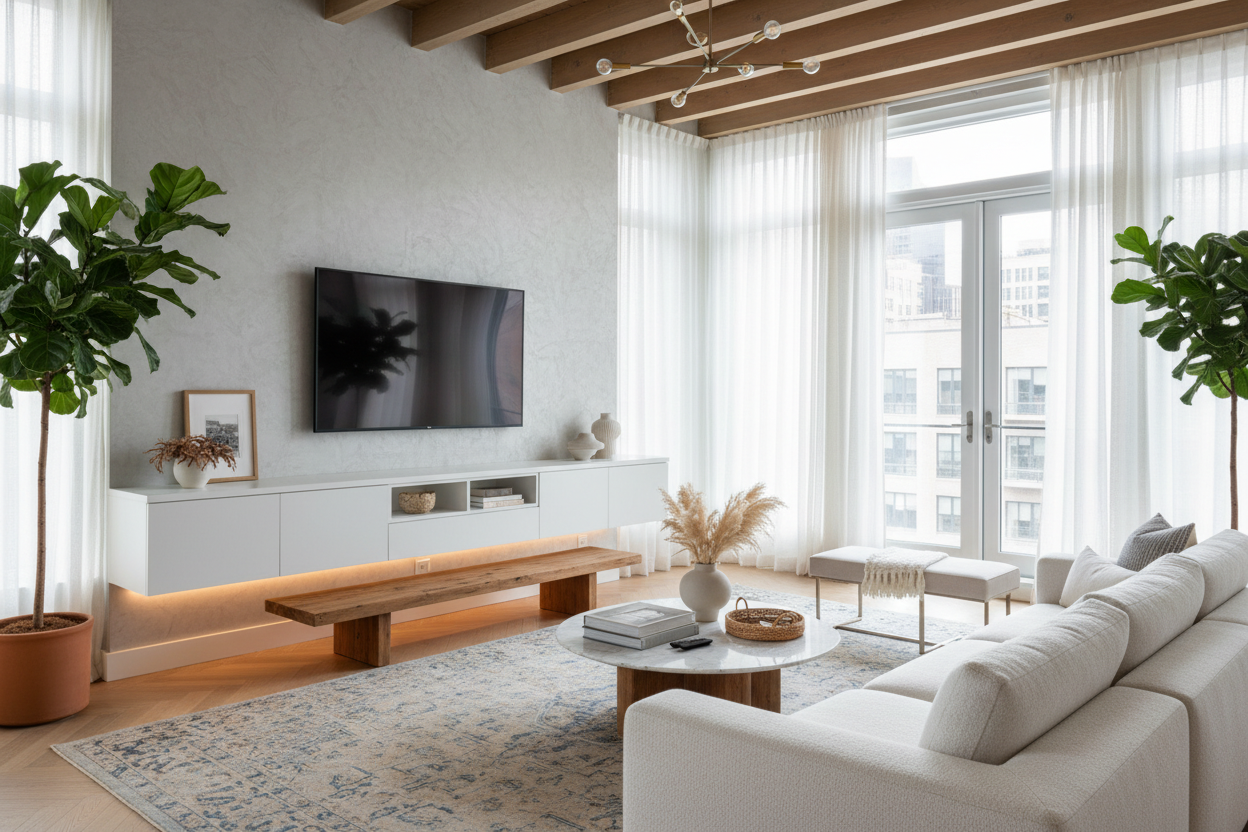
I remember my first studio apartment in Brooklyn. I spent three weeks' salary on a gorgeous, mid-century TV stand that looked amazing in the showroom but felt like a massive boulder once I squeezed it into my 400-square-foot living space. I couldn't even walk past it without turning sideways. That was the day I realized that wall mounted tv consoles aren't just a design trend—they are a survival tactic for small-space living.
If you're staring at your living room and wondering why it feels like the walls are closing in, the culprit might be your floor-bound furniture. By getting your media gear off the ground, you're not just organizing; you're literally reclaiming the floor. It's the oldest trick in the designer's handbook, and it works every single time.
Quick Takeaways
- Floating units create the illusion of more square footage by exposing the floor underneath.
- Mounting heights should be based on your seated eye level, not your standing height.
- Cable management is the difference between a high-end look and a mess of 'black spaghetti.'
- Always secure your unit to wall studs; drywall anchors alone are a recipe for a 2 AM disaster.
The 'Visual Weight' Problem With Traditional Floor Stands
Standard furniture has a way of anchoring a room in the worst way possible. When you have traditional TV stands, they create a solid block of visual weight that stops the eye right at the floor. In a small room, this makes the space feel bottom-heavy and cramped. You lose that precious sense of flow because your brain registers the footprint of the stand as occupied territory.
I’ve seen people try to fix this by buying glass stands, but that just shows off the dusty power strips behind them. The real issue is the lack of negative space. Most chunky wooden stands are built like tanks—great for storage, terrible for airiness. They trap shadows and make cleaning a nightmare. If you can't see the baseboard behind your furniture, the room feels smaller than it actually is.
How a Wall Mounted Media Unit Tricks the Eye
The secret to making a tiny room feel like a palace is continuous floor space. When your eyes can follow the flooring all the way to the wall, your brain perceives the room as larger. A wall mounted media unit exploits this psychological loophole perfectly. By floating the unit even 8 to 10 inches off the floor, you open up a sightline that was previously blocked by heavy legs or solid plinths.
Choosing a wall mounted media console entertainment center allows light to pass underneath the furniture. This eliminates those dark corners where dust bunnies and lost remote batteries go to die. It’s not just about the footprint; it’s about the 'air' around the piece. I recently helped a friend install a 60-inch floating unit in a narrow condo, and the change was instant. The room went from feeling like a storage unit to feeling like a curated gallery.
Finding the Perfect Height for Your Floating Setup
The biggest mistake people make with a wall mounted tv console table is hanging it too high. We call this 'rink-side seating' syndrome. You shouldn't have to crane your neck to see the screen. Ideally, the center of your TV should be at eye level when you're sitting on your sofa. Once the TV is set, you want to leave a gap of about 4 to 8 inches between the bottom of the screen and the top of the console.
If the gap is too large, the pieces look like they're drifting away from each other. You need a console for wall mounted TV that acts as a visual anchor. Think of it as a pedestal for your tech. If you have a massive 75-inch screen, your console needs to be wider than the TV by at least 6 inches on each side to keep the proportions from looking top-heavy. Balance is everything.
But Seriously, Where Do the Ugly Cords Go?
Nothing ruins the sleek vibe of a mounted media console faster than a 'tail' of black wires hanging down to the outlet. This is the number one reason people hesitate to go floating. But cable management isn't black magic. Most modern units come with pre-drilled grommets, but you still have to get the wires from the wall to the box. I always recommend using in-wall cable routing kits if you own your home.
If you're renting, a media cabinet for wall mounted TV often features a hollow back or a recessed channel specifically for this. You can also use paintable cord covers that blend into the drywall. My personal pro-tip: use Velcro ties instead of plastic zip ties. You’ll thank me the next time you have to swap out a HDMI cable and don't have to go hunting for scissors near your expensive power cords.
Will My Drywall Actually Hold This Thing?
I get this question constantly. Is my wall mounted tv media console going to rip the drywall out? The answer is: only if you're lazy with the installation. You cannot—and I mean cannot—rely on plastic butterfly anchors for a heavy media unit. You need to find the studs. Most homes have studs spaced 16 inches apart. Use a high-quality stud finder, mark your spots, and use heavy-duty lag bolts.
If your studs aren't lining up perfectly with the mounting holes, don't panic. You can often mount a plywood 'cleat' to the studs first, then mount the console to the cleat. It adds about half an inch of depth but ensures your expensive electronics don't end up in a heap on the floor. I once tried to shortcut this with a small shelf and woke up to the sound of crumbling plaster. Lesson learned: trust the studs, not the anchors.
Personal Experience: The Leveling Nightmare
A few years ago, I installed a beautiful walnut media console for wall mounted tv in my own place. I was so excited that I eyeballed the leveling. Big mistake. Once I put a soundbar on it, the slight tilt was all I could see. I spent the next three hours patching holes and re-drilling because I was off by a mere quarter-inch. Use a long level—at least 24 inches—and check it three times before you drive that first bolt. Precision is your best friend here.
FAQ
Can I install a wall-mounted console in a rental?
Yes, but you'll have to patch the holes when you move out. Most landlords don't mind as long as you return the wall to its original state. Just keep a small tub of spackle and some touch-up paint handy.
How much weight can these consoles actually hold?
It varies, but most well-built units can handle 50 to 100 pounds if properly mounted to studs. Check the manufacturer's specs, especially if you plan on storing a heavy vinyl collection or a vintage receiver inside.
Do I need a pro to install this?
If you can find a stud and use a drill, you can do this yourself. However, these units are usually heavy and awkward, so you definitely need a second person to hold it in place while you secure the bolts.

Leave a comment
This site is protected by hCaptcha and the hCaptcha Privacy Policy and Terms of Service apply.