


















I spent three hours leveling a wall mount for my 65-inch OLED last year, feeling like a DIY god. Then I stepped back and saw the reality: a PS5, a chunky router, and a tangled mess of HDMI cables dangling like vines in a jungle. It looked like a tech store exploded in my living room. The 'floating' look only works in staged catalogs where the TV isn't actually plugged into anything. In real life, you need dedicated stands for tv accessories to handle the heavy lifting.
- Weight capacity is non-negotiable; receivers are heavy.
- Airflow is the difference between a working console and a melted one.
- Depth matters—aim for at least 16 inches for modern tech.
- Cable management holes are your best friend.
The 'Floating Screen, Grounded Junk' Dilemma
We have all been there. You mount the TV to save floor space, only to realize your Apple TV, soundbar, and Nintendo Switch still need a home. Putting them on the floor looks like an unfinished basement project. This is where a dedicated stand for tv accessories comes in. It anchors the room visually and gives all that plastic hardware a place to live that isn't the carpet.
I tried using a tiny end table for a while, but it just looked cluttered. The scale was all wrong. You want something that matches the width of your screen, or slightly exceeds it, to create a balanced look. Without a proper base, your expensive TV just looks like it is hovering over a pile of trash.
Why Floating Shelves Constantly Fail Tech-Lovers
Floating shelves are a trap for anyone with more than a remote. Most of those sleek MDF shelves are rated for 15 or 20 pounds. A high-end AV receiver can easily hit 30 pounds on its own. I have seen drywall anchors rip out of the wall at 2 AM because someone thought a pine board could hold a gaming PC. It is a heart-stopping sound you do not want to hear.
Instead of risking your gear on a flimsy wall-mount, you should browse reliable tv stands that sit firmly on the floor. A floor-based unit handles the weight of heavy amplifiers and multiple consoles without breaking a sweat. Plus, you can actually hide the power strips inside the cabinet rather than having them dangle down the wall.
What Makes a Good Stand for TV Accessories?
When shopping for a tv accessories stand, depth is the most overlooked stat. Many modern 'minimalist' units are only 12 inches deep. That is fine for a DVD player from 2005, but a modern receiver or a PS5 needs 16 to 18 inches to breathe and allow for the cables sticking out the back. If you buy a shallow stand, you will end up with the doors permanently propped open by your wires.
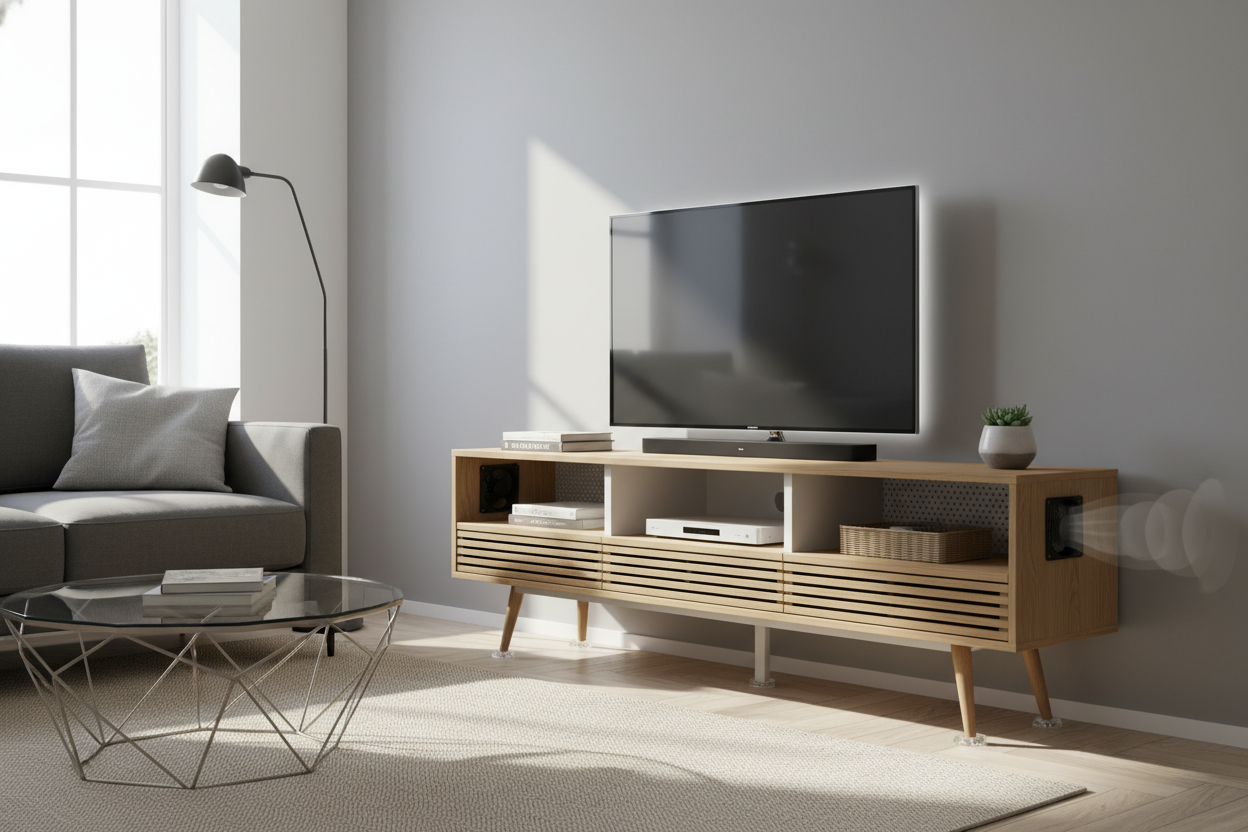
Ventilation is my other obsession. Tech gets hot. If you put a gaming console in a sealed wooden box, you are basically slow-cooking it. Look for slatted doors or mesh panels. It is all about finding the perfect tv stand for style and function. I personally look for units with removable back panels, which makes fishing cables through a thousand times easier than aiming for a tiny 2-inch hole.
Hiding the Mess: Closed Cabinets vs. Open Shelving
Open shelving is great for display, but it is a nightmare for dust. Tech is a dust magnet. If you go with an open design, be prepared to Swiffer every three days. I prefer closed cabinets with IR-friendly glass or cane webbing. This hides the 'black box' aesthetic while still letting your remote signals pass through.
If you have a soundbar, make sure the stand has a dedicated wide shelf at the top. Putting a soundbar inside a cabinet usually muffles the audio and ruins the spatial effect. A good middle ground is a unit with one long open slot at the top and closed doors below for the messier stuff like controllers and extra cables.
My Favorite Way to Style a TV Accessories Stand
To make your tech setup look like intentional decor, you have to break up the electronics. I like to put a stack of coffee table books next to the console or a small ceramic bowl to hold extra remotes. It softens the look. I recommend using a wide adjustable tv stand for living room spaces because it gives you the flexibility to expand as your tech collection grows.
My biggest mistake was buying a stand that fit my gear exactly. Six months later, I bought a larger center-channel speaker and it didn't fit. Always buy about 20% more space than you think you need. It gives the equipment room to stay cool and gives you room to grow. A little extra width also allows for a lamp on the side, which helps kill the glare on the screen during movie night.
FAQ
Do I need a stand if my TV is wall-mounted?
Yes, unless you have routed all your cables through the wall into a hidden closet. You still need a place for your consoles, routers, and soundbars to sit and vent properly.
How do I keep my consoles from overheating in a stand?
Choose a stand with slatted doors, mesh, or an open back. Never run a console with a solid cabinet door closed unless you have installed aftermarket cooling fans.
What is the best height for a TV stand?
Your eyes should be level with the middle of the screen when seated. For most sofas, that means a stand height of about 18 to 22 inches. If the stand is too tall, you will be straining your neck.


Leave a comment
This site is protected by hCaptcha and the hCaptcha Privacy Policy and Terms of Service apply.