

















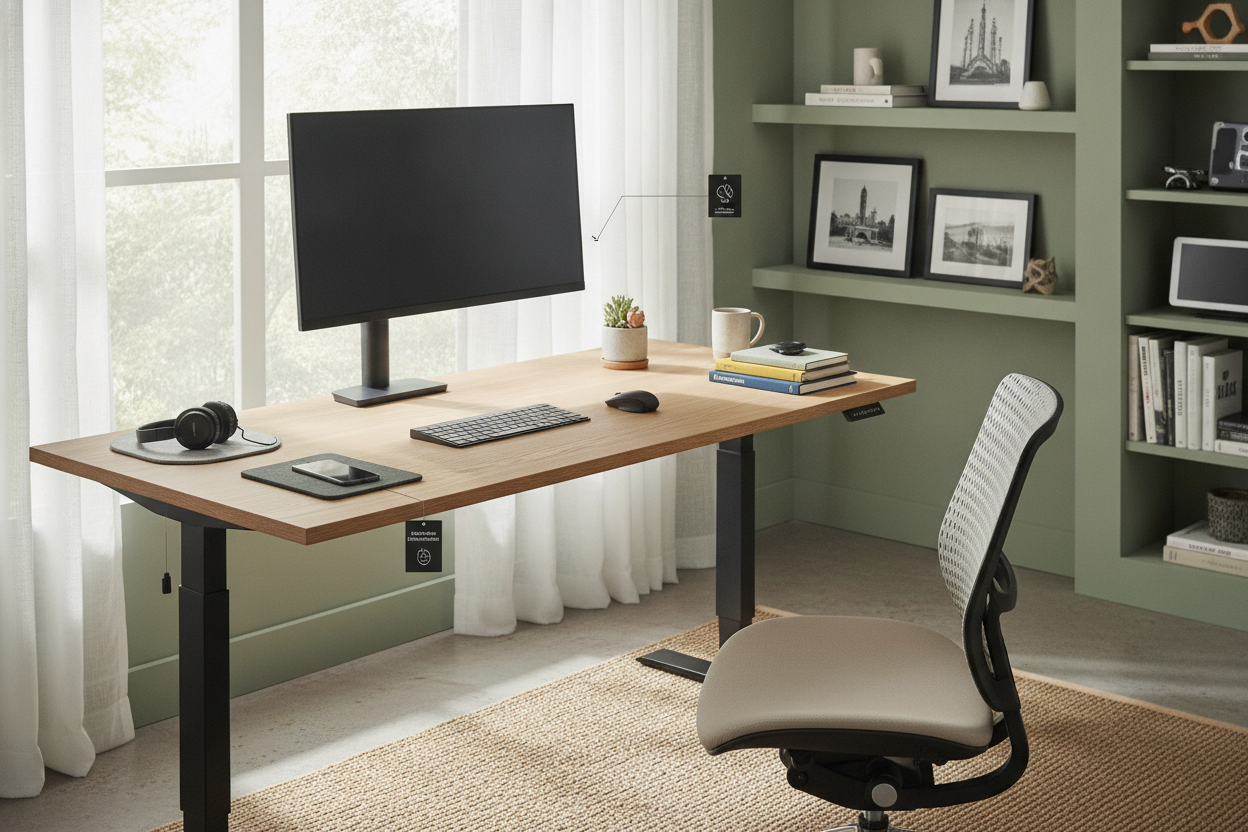
I spent three years working on a $40 thrift store find that shook every time I typed an email. When I finally upgraded to a dual-monitor setup with heavy-duty arms, that old particle-board surface literally started to bow in the middle. I realized I needed a beast of a workstation, not a budget buy, which is how I ended up with the mx-1000 standing desk dominating my spare bedroom. It’s a massive piece of furniture that changes how you interact with your room, for better and for worse.
Quick Takeaways:
- Stability: Rock solid even at 45 inches high with zero monitor wobble.
- Weight: It is incredibly heavy; do not attempt to assemble this without a second person.
- Speed: The dual motors are fast, moving at roughly 1.5 inches per second.
- Footprint: The 30-inch depth is great for your eyes but eats up a lot of floor space.
Why I Skipped the Flimsy Options for the MX-1000
Most desks you find online are designed for a laptop and maybe a succulent. But once you add a PC tower, two 32-inch monitors, and a heavy studio microphone, a standard writing computer desk starts to feel like a folding card table. I was tired of my monitors shimmying every time I hit the backspace key. The MX-1000 caught my eye because it has a 350-pound weight capacity, which is overkill for most, but exactly what I needed for peace of mind. Most 'heavy-duty' desks use 14 or 16-gauge steel, but this frame uses 11-gauge industrial steel that doesn't flex.
I also wanted a desk that didn't use a hollow honeycomb core. The top on this thing is a solid, one-inch thick slab that feels like it could survive a move—or three. If you are running a serious rig with multiple peripherals and heavy monitor mounts, skipping the entry-level stuff is the best favor you can do for your gear. It's the difference between a desk that lasts two years and one that lasts a decade.
The Setup Process: Prepare to Sweat a Little
Let’s be real: the delivery driver is not going to be your best friend when they drop this off. The mx-1000 standing desk arrives in two massive boxes that weigh a combined 160 pounds. I made the mistake of trying to drag the frame box up my stairs solo, and I’m pretty sure I heard my floor joists crying. Save yourself the chiropractor bill and recruit a friend to help you move the components to your office space before you even think about opening the hardware bags. Each leg alone weighs more than my previous desk.
The actual assembly isn't complicated, but it is physically demanding. You’re dealing with thick steel components that don't just slide into place—you have to line them up and bolt them down with some serious torque. It took me about 50 minutes from unboxing to the first test lift. One pro tip: don't tighten the crossbar bolts all the way until you’ve got the desktop aligned. If you lock everything down too early, you'll find yourself loosening twenty M8 bolts just to get the pre-drilled holes to match up. It’s a frustrating lesson I’ve learned the hard way, and with a desk this heavy, you don't want to be flipping it over more than once.
Testing the Motors: Smooth, Silent, or Shaky?
A standing desk is only as good as its movement. If it’s loud enough to wake the neighbors or so slow that you lose interest in standing, it’s going to end up stuck in the 'sit' position forever. I’ve tested desks that sounded like a coffee grinder, but the MX-1000 is impressively quiet. It’s more of a low hum than a mechanical grind. It moves fast enough that you aren't standing there awkwardly waiting for it to reach your height during a meeting. The transition is smooth enough that my coffee doesn't even ripple, which is a testament to the motor dampening. No jerky starts or sudden stops here.
The real star here is the controller. I’ve used basic up/down switches before, and they are a chore. Having an electric lift system with memory presets is non-negotiable for me now. I have one button for my perfect sitting height and another for my standing height. I can tap the button and walk away to grab a glass of water, and when I come back, the desk is exactly where it needs to be. It also features an anti-collision sensor that is surprisingly sensitive. I accidentally left my office chair under the edge once, and the desk stopped immediately instead of crushing the armrest. That kind of tech is what separates the professional gear from the cheap clones.
Styling a Massive Tech Desk in a Normal Room
The biggest challenge with the mx-1000 standing desk is its sheer presence. It’s 30 inches deep and often 60 to 72 inches wide, which means it can easily look like a piece of factory machinery that got dumped in a spare bedroom. When it first arrived, my office looked like a server room. To soften the industrial look, I looked into some designer ideas for standing desk layouts to help integrate the bulk. I found that placing it against a dark accent wall helped the black steel frame blend in rather than stand out as a giant, distracting silhouette.
Cable management is where you’ll win or lose the styling battle. Because this desk moves, you can’t just zip-tie everything to the leg. You need a snake or a cable tray that can expand and contract. I added a large under-desk tray to hide my power strips and bricks. Once the 'rat's nest' of wires was gone, the desk actually looked like a piece of furniture. Adding a large felt desk mat and a warm-toned lamp on one side also helps break up the sterile, tech-heavy vibe. It’s about balance—functional gear on one side, human touches on the other to keep the room feeling like a home.
Is the MX-1000 wobbly at its highest setting?
No, and that is its biggest selling point. Most T-frame desks get the 'tall man shakes' once they pass 40 inches, but the heavy steel base and wide columns keep this one stable. You might see a tiny bit of monitor movement if you're an aggressive typist, but it’s the sturdiest desk I've ever used.
How loud are the motors during a meeting?
I’ve adjusted my desk while on Zoom calls and nobody even noticed the sound. It’s a low-frequency hum that is easily filtered out by most noise-canceling microphones or standard laptop mics.
Can I use my own desktop with the MX-1000 frame?
Yes, the frame is width-adjustable. If you have a custom live-edge slab or a specific countertop you love, you can just buy the frame separately. Just make sure your top is at least 1 inch thick to handle the mounting screws.

Leave a comment
This site is protected by hCaptcha and the hCaptcha Privacy Policy and Terms of Service apply.